Recent Posts

Showing posts with label Google. Show all posts

Thursday, August 23, 2012

Improve Your Site's Search Ranking Using SEO!! Tips and Tricks!!

As any website owner knows, search-engine optimization—SEO—is a rapidly moving target. What worked well last week might work against you today. Hordes of website operators learned this the hard way earlier this year, when two key updates to Google’s algorithms took effect. Known by the cute code names of “Panda” and “Penguin,” these updates were designed to severely penalize websites with thin, weak, or duplicated content. The goal: To rid Google’s search results of content farms and spam blogs by using quality metrics, instead of merely relying on the old PageRank system to measure a site’s importance.
The end result has been to force webmasters to do what pros have been advising for years: Stop stuffing keywords into low-grade copy and focus on quality. Unique blogs, images, and video are all increasingly key in today’s Web world.
Of course, more and more scenery, so to speak, accompanies this mandate. Google+ might not yet matter much to most individuals, but it’s becoming more important to search engines, along with Facebook and Twitter links to content. How your site looks and loads on a mobile browser is also increasingly important, as search results are ever more accessed via smartphone.
All of that is merely prologue: If you’re not already working on all of the above, you’re far, far behind. For those already following this advice, now is the time to take a look ahead at what the next 18 months of SEO are likely to bring. We spoke to dozens of experts to get the skinny on SEO for 2013. Here are the top tips we discovered.

This Website Will Disavow Any Knowledge of Your Actions
How to Improve Your Site's Search Ranking using SEO
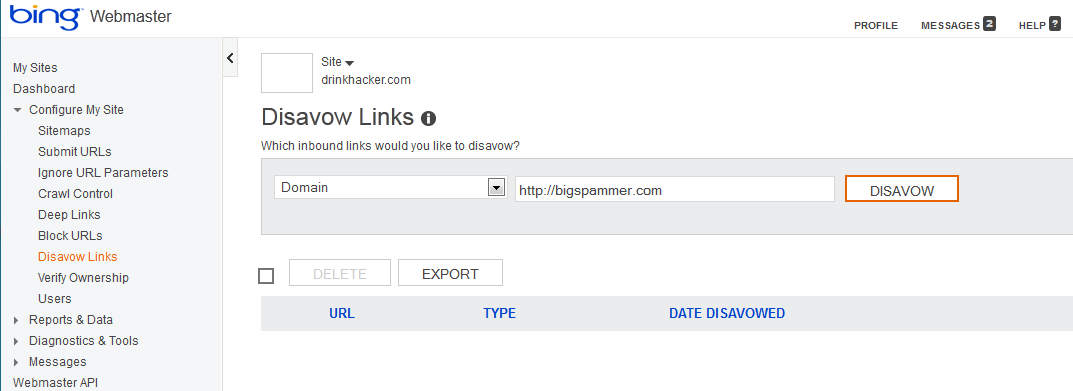
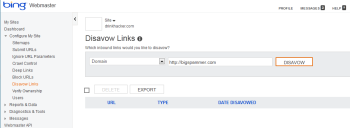
Use this tool to prevent Bing from penalizing your site if spammy sites link to it.What happens if someone links to you from a spammy website? It makes you look bad; in fact, search engines can deem that your site is in fact a spam site as well. Your site is guilty by association, even if you have nothing to do with the linker.
Bing has rolled out a tool in its Webmaster Tools that let you “disavow” links from such places. It’s largely self-explanatory. Just add a page or domain to the tool and click the Disavow button to tell Bing you do not approve. This may improve your site's position in search results, but almost certainly it will help to rid the Web of some of its spam. Google’s “disavow” tool is expected in the coming months.
Carson Ward of Distilled.net (one of several online marketing agencies whose experts we interviewed) says these "disavow" tools will raise a lot of questions for search optimizers. “Will site owners be more likely to use tactics that search engines frown on if they can simply turn and tell search engines to discount the spam they have created? Will search engines trust site owners to crowdsource spam detection, and should they? Google's implementation of a disavow tool will largely determine the future of Web spam.”

It’s Not Where They Link, It’s How They Link

Ryan Draving, CEO of CompeteLeap, stresses that machine-generated writing and “spinning” (rewriting or slightly changing someone else’s content to look original) will become useless or even detrimental to your website, adding, “Search results will begin to shift more and more toward brands, and away from websites built purely for SEO. Brands typically invest in the kind of quality content that generates strong links from, and engagement with, bloggers, other websites, and users on social media networks.”
Those incoming links are still critical, but Draving notes that over-reliance on exact keyword phrases coming into your site (like “Chicago emergency plumber”) will penalize you. Says Draving, “Keep less than 11 percent of external links coming to your website via exact keyword phrases. Google expects to see either your URL or your company name as the link text for the majority of your inbound links. So instead of asking every website to link to you with your favorite keywords ('DIY Internet Marketing'), allow them to use the text they want.”

Don’t Discount Yahoo

It’s long been a habit for website operators to forget about Yahoo, even though Yahoo and Bing combined still have nearly a 30 percent market share. But what happens now in the Marissa Mayer era? Will Yahoo rise again as a search leader? Kaysha Kalkofen, co-founder of tSunela, says, “Keep an eye on Yahoo's relationship with Bing, especially in the paid search space. If that evolves, the paid search market will open up again.”

Take the Credit
How to Improve Your Site's Search Ranking using SEO
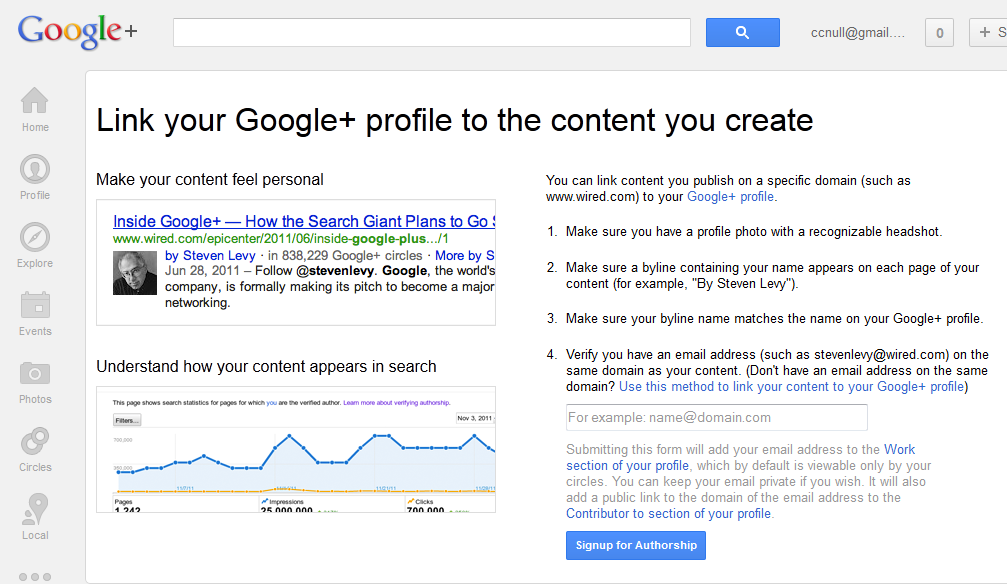
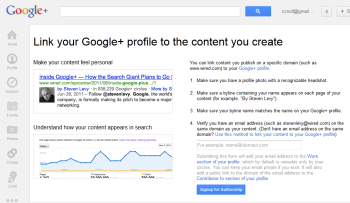
Author rankings could become more important than page rankings in the second half of 2013.Have you ever done a Google search and noticed head shots next to a few of the posts at the top of the results? This is part of an experimental program within Google designed to link authors with published content, regardless of where that content lives.
Jon Payne, President and Founder of Ephricon Web Marketing, explains how “AuthorRank” works: “It’s generally the case that most significant websites have many different authors that contribute to their content. Google is looking at how to trust links from one author versus another, and weight them differently. We see AuthorRank replacing PageRank most likely in the latter half of 2013. Businesses must set up the ability to claim authorship of their content, but the process is pretty easy and (not surprisingly) is mostly handled within Google+.” To get started with the process, get your Google+ profile up to snuff (you must have a recognizable face-shot photo as your profile picture) and check out plus.google.com/authorship.
How to Improve Your Site's Search Ranking using SEO

Seek Out Snippets

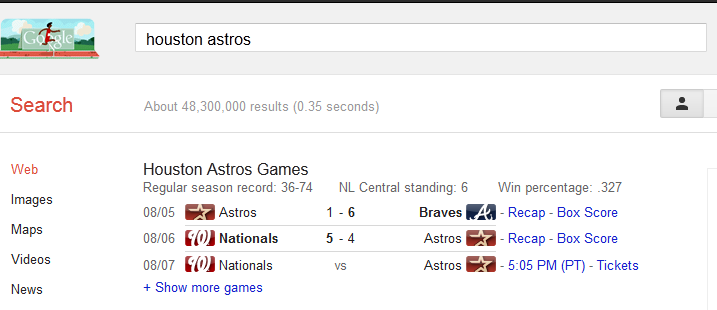
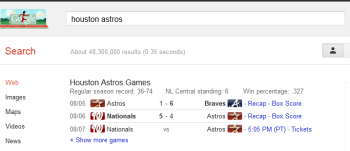
Structured information, known as "rich snippets," can help your site float to the top of search results. In related news, you may also notice that when you search Google, little tidbits of information float up to the top: Search for a baseball team, for example, and their current record and recent games will appear first. These are called “rich snippets,” a form of structured information that can get your content to the top of search results.
David Erickson, publisher of the e-Strategy blog, says, “Webmasters should take a look at their search results and those of their competitors to see if any of the listed sites are accompanied by rich snippets. If so, I'd take a look at the type of structured information being included in those results and see if you can include such information on your own site. If you're using WordPress, there are often plug-ins available that help ease the formatting of such information.”

Publish More Than You Think You Should

The days of weekly updates are over. Google is increasingly favoring fresh content, and that means publishing not just daily but multiple times per day if possible. Nicholas E. Kinports, Digital Strategy Lead of lonelybrand, says, “Digital marketers should create and stick to an editorial calendar that provides for new content several times per day that is unique and industry-focused. That content should be woven throughout Web and app pages to create a dynamic ecosystem.”

How to Improve Your Site's Search Ranking using SEO
Updating your site frequently is one sure way of boosting your search engine ranking.
This makes logical sense in the Twitter era, says Josh Gross, SEO specialist with Coalition Technologies, who adds, “A website that more frequently updates its content is likely to be more relevant then a website that only makes periodic updates.”

Google Gets in the Shopping Game

Google Shopping has long been a small yet significant way for merchants to drive traffic directly to their products without having to buy an ad. That’s about to change: Google Shopping is going pay-for-play (via a system much like AdWords), which means that the days of free product links are coming to an end. It’s too early to say how expensive this might end up being, but for now, says Jeff Soukotta, Founder of Adaptise, e-commerce site operators should prepare to become familiar with the changes and start thinking about budgets.

Speed Matters

In the quest to make websites more feature-filled and social, website operators often saddle their sites with scripts and plug-ins that take their toll on how quickly the site loads. A slow site isn’t a monumental thing, but users hate sites that won’t load. As a consequence, Google is increasingly becoming interested in the topic, and it’s likely to play a more important role in rankings down the line. As Tom Hughes-Croucher, Principal of Jetpacks for Dinosaurs, sums it up, “In effect, Google isn't just looking for the most keywords per landing page, it is looking for the best landing page experience for users.”

Monday, July 23, 2012

Google's Nexus 7 Disappears from Play Store!!! :P

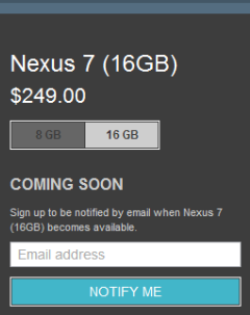
Google’s $250 16GB Nexus 7 tablet disappeared from Google’s online Play store over the weekend due to overwhelming demand, according to an online report. A message on Google Play advises tablet shoppers to sign up for e-mail alerts to learn when the tablet is back in stock. 
Google has not said why the 16GB Nexus 7 is no longer for sale, but anonymous sources “close to Google” told the Guardian that the search giant “seriously underestimated” demand.
Google appears to have been dealing with limited supplies of 16GB Nexus 7 devices for some time. The company recently answered concerns about when customers will get their new Google tablets by publishing a rough timetable for delivery.  All 16GB devices ordered through the end of July 11 were supposed ship by July 20, and Google says remaining orders will be shipped by Friday, July 27. 
Recently, stocks of the Nexus 7 were also proving difficult to find on local retail shelves.  GameStop quit taking orders for the Nexus 7 shortly after the tablet started shipping in mid-July, and around the same time Staples announced it was sold out. Staples now lists the Nexus 7 as available in-store only and on special order, and GameStop lists the Nexus 7 16GB tablet as back-ordered.
As usual with any hot new tech item, eBay sellers are offering Nexus 7 devices at a premium for those unwilling to wait for more devices to ship.
While demand for the Nexus 7 is good news for Google, we're also hearing reports of display issues including backlight bleeding, touch responsiveness problems, and defective manufacturing. The Nexus 7 isn’t the first popular tech device to have production quality issues. When the iPhone 4 first debuted, some early customers reported yellow discoloration on the smartphone’s display that was later linked to residue from the manufacturing process. Similarly, some early buyers of the iPad 2 complained of backlight bleeding.
The $200 8GB Nexus 7 is available only through Google Play and is currently shipping within three to five days.

Thursday, July 12, 2012

Unlocked Galaxy Gets Android Jelly Bean Update!!

Have a Samsung Galaxy Nexus that isn't running on Verizon or Sprint? Well good news! The update to Android Jelly Bean has started rolling out and should be hitting your phone in the next couple of days. The update brings with it Google Now, new notifications, and a much more responsive interface thanks to Project Butter.
In the Google+ post that announced this exciting bit of news, Google also mentioned that the Motorola Xoom, Nexus S, and other Galaxy Nexus phones (it presumably meant those running on Sprint and Verizon), were the next devices in line to receive the upgrade to Jelly Bean. The company also stated that the Nexus 7, which is shipping later this month, would be running the latest Android operating system--something which it had already announced at Google I/O last June.
Unfortunately, outside of the Nexus 7, Google didn't give a timeframe for when we could expect the update to become available to those other phones (and tablet). Hopefully it's sooner rather than later, but at least for now more people can enjoy the benefits of owning a Google developer device.

For More Details, Click Hare 

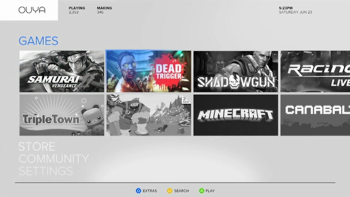
Android-Powered Ouya New Games Console!!

It’s not a secret that gamers are pining for new hardware. Whether that’s next-gen consoles or new handhelds, it doesn’t really matter, they just want something new to play games on. That seems to be where the fervor directed at Ouya comes into play.

For More Details, Click Hare 


Our own Jared Newman wrote about the console's unveiling and what you need to know already, but I find the whole concept of a new, Android-powered home console extremely interesting. Android isn’t what I would immediately think of if someone asked what operating system a low-cost home console should run on.
There’s a few reasons, but the biggest is the state of games on Android platforms. Take a minute to search through Google Play (formerly known as Android Market) and find some of the few games that have actually been optimized for Android tablets; there aren’t many. Now take that number, compared to the overall number of games available for Android, and try to estimate how many of those will be optimized for play on a television. Maybe a few dozen, at most?
Thousands of people are investing in a system that will be able to play a few dozen games at launch. That isn’t much. Sure, it’s all about investing in the future. Developers might start to optimize their titles once they realize that there’s a market for them, but that takes time. Unless developers can get their hands on final Ouya hardware a few months ahead of time, they won’t be ready for launch (The Ouya Kickstarter does claim that some developers will receive Ouya dev kits before the console launches -- Ed.). The Android OS is known for being very picky about the specific type of hardware that the user has. An application might work perfectly on one phone, but not at all on another, simply because of the onboard video card. That’s the first challenge that users are going to have to face, but there’s plenty of challenges ahead for developers as well.
One of the biggest issues with Android is piracy. The whole appeal of Ouya is that it’s open-source, the console manufacturer doesn’t decide what is allowed on the console and what isn’t. That also means that they don’t really decide how things go on the console. Any Android application is available illegally by simply searching for the name of the application and file type and I see that being the case for games released on Ouya as well. According the manufacturer, the console will have a USB port for expanded storage, and that could very well be used for this nefarious purpose.

One of the main features of Ouya is that some part of the game has to be free-to-play. Developers can charge for titles, but they have to offer some kind of demo or trial. It’s a good model, because most gamers want to be able to try something out before they put down their money. This is something that PlayStation has done a great job with; they offer 60-demos of most of their titles to PlayStation Plus users, and I’m hoping that we see something similar here. Even with this caveat, there are still full versions of games and with Ouya’s open-source nature, you can bet that someone will find a way to crack and distribute them. It’s something that developers are going to have to consider before putting in the effort and development time to optimize their titles for Ouya.
We really have no idea what Ouya could do. It’s an extremely novel concept and the Kickstarter video sold me on the UI (something that I always find troubling with Android), but there’s still so much that’s unknown. We don’t even know what the left side of the controller looks like! We can only hope that they reveal more information as the Kickstarter campaign continues. At the time of writing, they’ve raised over $3.2 million dollars and it has been less than 48 hours. That says something about what gamers are looking for.

For More Details, Click Hare 

Monday, July 2, 2012

How to Install Ice Cream Sandwich on Your Kindle Fire!!

How To Hack Your Kindle Fire
With a vibrant 7-inch IPS display and a 1GHz dual-core processor, the $199 Kindle Fire can make for one lovely tablet. With a bit of work--but no hardware modifications--you can set up Android 4.0 on your Kindle Fire and thenceforth use the device as a powerful general-purpose tablet despite its incredibly low price. Email, games, Web browsing (with Chrome for Android or any other browser)--the Kindle Fire can do it all.

For More Details, Click Hare 


This guide is directly based on the excellent guide written by XDA Developers user Kinfauns. Kinfauns's guide and his Kindle Fire for Beginners guide are highly recommended reading, but they're fairly lengthy. We've simplified the process and then tested it ourselves, so we can walk you through all of steps; but please use caution when tinkering with your gear, and understand that PCWorld accepts no responsibility for the consequences. That said, read on for a quick step-by-step procedure that you can follow to transform your Kindle Fire into an Android 4.0 tablet!

Ingredients

You will need:
  • A Kindle Fire with a full battery (if it's not full, take time to recharge it fully).
  • A USB cable for connecting the Kindle Fire to your computer.
  • A Windows computer that you have Administrator rights for.
  • fbmode by XDA Developers user Pokey9000.
  • The FIREFIREFIRE bootloader for Kindle Fire.
  • The TeamWin Recovery image, also known as TWRP.
  • The Kindle Fire Utility, a third-party toolkit that simplifies many tasks and includes vital drivers.
  • An ICS (Android 4.0) ROM for the Kindle Fire. You can pick one from this list of ROMs. For this wow-to, we'll be using AOKP, a well-regarded third-party ROM. The latest AOKP version at the time of this writing is build 38, but it's a good idea to check for the most recent version.
  • [Optional] The Google Apps bundle, including Gmail, Google Play, and other essential Android apps. This is packaged separately from the ROM for legal reasons. If you download AOKP, you can find Google Apps for AOKP release 38, under GApps (the last link on the page).
  • A willingness to void your warranty and to use the Windows command line. This how-to does not use graphical tools.

Install the Kindle Fire Drivers

For this procedure to work, your computer must correctly recognize the Kindle Fire as an Android device. Here's how to make that happen:
1. If your Kindle Fire is connected to your computer, unplug it.
2. The KFU zip contains a folder called Kindle Fire Utility. Unzip the contents of this folder into a new folder, c:\kfu.
3. Run the install_drivers.bat file that's in the c:\kfu folder. Windows will pop up a UAC prompt, and then start the Kindle Fire Driver Installer.
4. As you step through the installer, you'll receive a Windows Security alert warning you that the drivers are not signed. Install the drivers anyway.
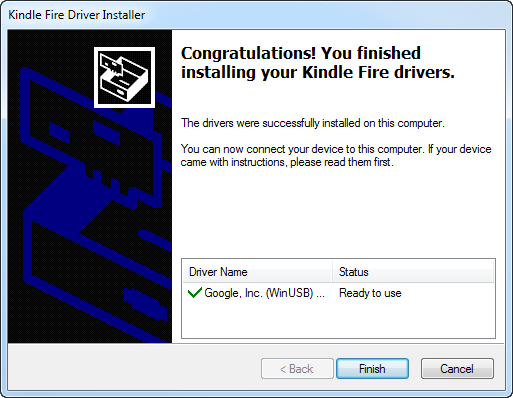
5. The installer should complete successfully and show a confirmation dialog with the driver name:
Kindle Fire driver installation confirmation.Kindle Fire driver installation confirmation.

Verify That the Drivers Were Successfully Installed

Before doing anything risky with your Kindle Fire, make sure that your PC fully recognizes it as an Android device:
1. Connect the Kindle Fire to your computer and wait for a few moments while Windows recognizes it (even if you've plugged it in before).
2. Run Device Manager (Click Start, right-click My Computer, and then select Manage > Device Manager).
3. You should see the Kindle Fire registered as an Android Composite ADB Interface, under Android Phone in the Device Manager tree.
If you see this listing, you're good to go. If this isn't exactly what you see, you'll need to do some troubleshooting; for that, refer to the original guide which has an extended troubleshooting section under the heading "What can I do if the drivers won't load?"

Switch to Fastboot Mode

It's still not too late to turn back. Up until this point, you haven't done anything to the Kindle itself. But now you're about to take the first step that involves making changes to the tablet. So, without further ado:
1. Make sure that the Kindle Fire is still connected to your computer.
2. Create a new subfolder, c:\kfu\software.
3. Unzip fbmode.zip into c:\kfu\software. It contains a single file, called fbmode (with no suffix).
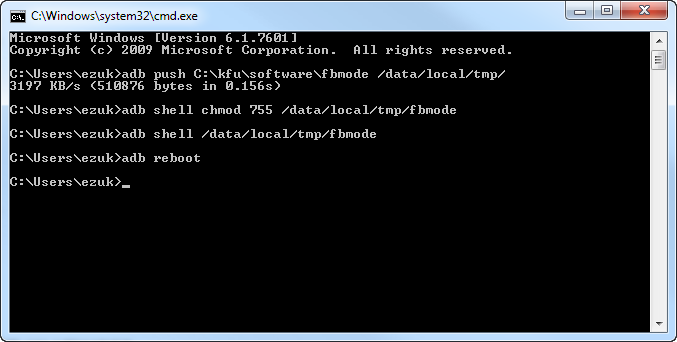
4. Open a command prompt window, and copy fbmode into a user-writable location on the Kindle Fire using ADB:
adb push C:\kfu\software\fbmode /data/local/tmp/
5. Edit fbmode's permissions so that it can run:
adb shell chmod 755 /data/local/tmp/fbmode
6. Run fbmode to switch to fastboot mode:
adb shell /data/local/tmp/fbmode
7. Using ADB, reboot the Kindle Fire:
adb reboot
At the end of this process, your command prompt window should look like this:
Command prompt window after switch to fastboot mode.Command prompt window after switch to fastboot mode.
Your Device Manager should look like this:
Kindle Fire listing in Device Manager after switch to fastboot mode.


The meaning of this notation is that the name of the device changes from Android Composite ADB Interface to Android ADB Interface.
Finally, the Kindle Fire itself should look like this:

Kindle Fire screen after switch to fastboot mode.Kindle Fire screen after switch to fastboot mode.
The Fire will simply display a logo and stay put. It's not "stuck"; rather, it's in fastboot mode, awaiting further instructions.

Install a Recovery Image

Next, you'll install a recovery image--a miniature operating system that you'll use later to flash the complete ROM. The recovery image will also come in handy for creating full backups of the device, among other things.
1. Copy the TWRP .img file into c:\kfu\software. At this writing, the latest TWRP image is named openrecovery-twrp-blaze-2.1.1.img.
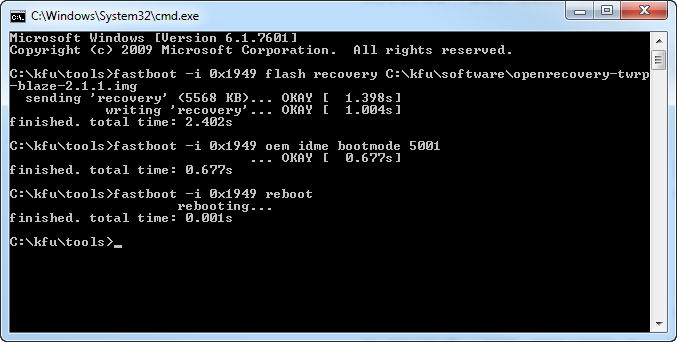
2. Open a command prompt window at c:\kfu\tools and install the image:
fastboot -i 0x1949 flash recovery C:\kfu\software\openrecovery-twrp-blaze-2.1.1.img
3. Change the boot mode to Recovery:
fastboot -i 0x1949 oem idme bootmode 5001
4. Reboot into TWRP:
fastboot -i 0x1949 reboot
At this point, your command prompt should look like this:
Command prompt window after installation of recovery image.Command prompt window after installation of recovery image.
And your Kindle Fire should look like this:
Kindle Fire screen after installation of recovery image.Kindle Fire screen after installation of recovery image

Install a Custom Bootloader

You are well into the process now. Next, install the FIREFIREFIRE custom bootloader:
1. Take the FIREFIREFIRE Zip file and place it (still zipped) into c:\kfu\software. At this writing, the latest filename is called fff-u-boot_v1.4a.zip.
2. Copy FIREFIREFIRE into the Kindle Fire's /sdcard directory:
adb push C:\kfu\software\fff-u-boot_v1.4a.zip /sdcard/
3. On the Kindle Fire, press the Install button. Navigate to /sdcard if needed (you should already be there by default), and select fff-u-boot_v1.4a.zip.
4. Swipe to confirm. You should get a success message:
Custom bootloader success message.Custom bootloader success message.
5. Back up the stock OS so you can roll back to it at any time. In the root TWRP menu, select Backup, modify the options if you like (the defaults are fine), and swipe to confirm. Backing up will take a while, which is one of the reasons why starting the process with a full battery is so important.
Backing up the stock OS can take a while.Backing up the stock OS can take a while.

Flash the Ice Cream Sandwich ROM

You're almost there! Now you just need to copy the ROM and flash it. As noted at the outset, we used AOKP in our test runs, but different ROMs may have different flashing procedures. Read the documentation for the ROM of your choice.
1. Place the .zip files containing the ROM image and Google Apps into c:\kfu\software.
2. Push the ROM and Google Apps onto the device:
adb push C:\kfu\software\aokp_otter_build-38.zip /sdcard/ adb push C:\kfu\software\gapps-ics-20120429-signed.zip /sdcard/
3. In TWRP, select Wipe > Factory Reset. This will remove all existing files from the data and cache partitions, but it won't affect the /sdcard directory, which contains media files.
4. In TWRP, select Install. Navigate to the ROM .zip file that you placed on the device, tap it, and swipe to confirm. This will take a few moments:
Installing the Ice Cream Sandwich ROM.Installing the Ice Cream Sandwich ROM.
5. Once that is done, tap the Back button in the upper right corner, and repeat the process with the Google Apps .zip file.
6. Tap Reboot System in the lower right corner, and boot into your brand-new Android 4.0 experience! If you wish, you can now remove the ROM and Google Apps .zip files from your device.
You should have a fully functioning Android tablet in your hands, so play around with it and let us know what you think. If you run into any problems during installation, share them in the comments below so that the community can pitch in and help you solve them. Good luck!

Thursday, June 28, 2012

Google Nexus 7 Can Heavily Impact Tablet Wars!!

Complete Coverage
Best current price: $199
With Wednesday's launch of its Nexus 7 tablet, Google gives the current tablet market a much-needed jolt of energy.
The Nexus 7 is the tablet that Google should have launched with a year ago. The Nexus 7 packs a high-performance, no-compromise set of features at attractive prices--$199 for the 8GB model and $249 for the 16GB model.

This winning--on paper--combo will immediately put the Nexus at center stage. It also will make all current Android tablet makers reevaluate their own offerings on the market. But selling a tablet directly to consumers online, with no clear changes to the app ecosystem behind it, won't be enough for Google to gain market share at Apple's expense.
Google Nexus 7Google Nexus 7Manufactured by Asus, the Nexus 7 tablet represents the first commercial manifestation of Nvidia's Project Kai. Nvidia designed the Kai reference platform to provide manufacturers with a shortcut blueprint of how to create a competitive tablet at consumer-friendly pricing.
At CES 2012, when Nvidia and Asus announced plans to produce a Tegra 3 tablet for $250, the two companies clearly had the Amazon Kindle Fire in their sights.
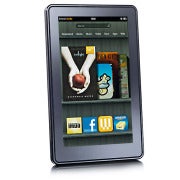
Amazon Kindle FireAmazon Kindle FireThe Kindle Fire, which shipped last fall, is the best-selling Android tablet thanks in large part to its low price of $199. But the Kindle Fire takes a lot of heat for its mediocre 1024-by-600-pixel display, its forked Android operating system, its limited specs (no camera, little onboard storage, no expansion), and its slow performance. Sales numbers for the Kindle Fire have dropped off since the initial burst of enthusiasm from consumers; but no other Android tablet has made a significant impact, either.

Google Takes Charge of Its Own Tablet--Sort Of

Google's move into the tablet arena with its own branded Nexus tablet is significant for several reasons. First, it shows that the company recognizes how important it is for an OS maker to be deeply involved in creating hardware that complements its own software.
For evidence, look no further than the mess of compromises and mediocrity we've seen from Android tablets over the past year, including poor choices in weight, processors, display, and design.
In today's Apple-dominated, post-PC age, a tablet with hardware designed independently of its operating system is unlikely to emerge as an impressive flagship device. And certainly that approach isn't the way to generate the Apple-level frenzy that every tablet maker yearns for.
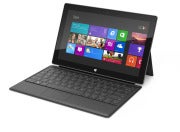
Microsoft Surface tabletThat's why Microsoft jumped into the PC hardware fray for the first time in 37 years, with last week's introduction of the Microsoft Surface tablet.
Microsoft Surface tablet[Read: "Microsoft Hardware: Successes and Failures"]
And it's why Google is expanding on what it already offers with its Nexus phone line by now offering its own tablet. The company should have taken this step last year when it launched Android 3.0 Honeycomb, the first operating system designed specifically for tablets, instead of crossing its fingers and hoping for the best with the spectacularly unimpressive Motorola Xoom tablet.
To what extent the Nexus 7 embodies Google's vision of a tablet is unclear. One area where Google may have influenced its design is in the tablet's inclusion of near-field communication capability. But beyond that, the core specs for the Nexus 7 are the ones that Nvidia and Asus talked about as far back as CES.
Back then, Asus went so far as to introduce the Asus Eee Pad MeMo 370T with specs, price, and a time frame for availability that are quite similar to the Nexus 7's. Since CES, however, Asus has said nothing more about its MeMo plans. Now we know why.
Clearly, all parties recognized that for the Android tablet OS to succeed, something had to change. And the reality of Kai should have a significant impact on current tablet makers.
How can Toshiba's Excite 7.7 tablet, priced at $550 and carrying a 1280-by-800-pixel display, compete with Google's Nexus 7 when the latter offers the same screen resolution and costs $300 less? The Toshiba does have a 0.7-inch larger screen, but both have 16GB of memory and both run on an Nvidia Tegra 3 processor.
Meanwhile, Amazon is rumored to be prepping its coming Kindle Fire replacement for a midsummer launch. Whether Amazon will step up its game with that tablet remains to be seen; but based on today's news, we believe that the company will need to have a competitive answer to remain firmly in the mix.
Here's a chart that compares the specs of the Google Nexus 7 to five other tablets:

The Missing Elements

So far, Google hasn't indicated that it will sell the tablet anywhere except at its Google Play online store. Consequently, consumers who want to do their own hands-on comparison of the Nexus 7 with other tablets will be out of luck.
Google's approach with the Nexus 7 addresses a relatively small subset of the problems facing the Android tablet market. Among the other issues to be resolved in the bigger picture are better-resolution displays and improved, lighter designs.
Google Android 4.1 (Jelly Bean)Perhaps most significantly, Google's conference has as yet lacked any discussion of the OS- and device-fragmentation issues that plague developers. I routinely hear these issues cited as the number-one reason that developers choose to make an iPad app instead of an Android app; and the tiny market share that Android tablets have thus far achieved has done nothing to convince developers to fully embrace the Android tablet ecosystem.
Google played up the fact that the company now lists some 600,000 apps in the Play store; but it didn't say how many of those apps are optimized for and work well on a tablet.
Google Android 4.1 (Jelly Bean)The app ecosystem, unfortunately, still remains a sticking point for Android tablets--and a key factor that makes it harder to recommend an Android tablet to consumers eager for the next great, cool app.
The bottom line is Android still has a long way to go to surpass Apple's iPad. But when we look back, the delivery of the Nexus 7, with Android 4.1 Jelly Bean, may mark a turning point in the Great Tablet Wars.

Google I/O: Chrome Browser Improvements; Chrome and Google Drive for iOS; New Chromebooks!!

Google I/O: Chrome Browser Improvements; Chrome and Google Drive for iOS; New ChromebooksGoogle Thursday announced improvements to its Chrome browser, improvements to Google Docs, and Chrome and Google Drive for iPhone and iPad, among other things on Day Two of the Google I/O developer conference in San Francisco.

  For More Details, Click Hare 

Google Drive Improvements

While today's announcements paled in comparison to those rolled out in yesterday's big show, a few of them will certainly be of interest to consumers.
Perhaps the most substantial announcements concerned Google's Drive cloud-based suite of productivity apps (formerly known as Google Docs).
One cool improvement to the product lets you work on word documents when you are not connected to the internet. The capability is available immediately for word documents, and later on for spreadsheets and presentations.
Google Chrome product manager Brian Rakowski.
Google has been working to allow us to sync our Drive documents between different kinds of devices, and to work on documents with our friends or workmates regardless of the type of devices being used.
To that end, the company announced that Drive will now be available for use on the iPhone and the iPad. You can now add people to collaborate with.
Developers can now design their apps to send faxes, and send and receive documents, using Drive.you from within Drive; while collaborating you can see your document updating in real time on whatever tablet or phone you may be using.
Google says that more than 10 million people began using Google Drive "in just over 10 weeks" after its release.

Chrome Browser Improvements

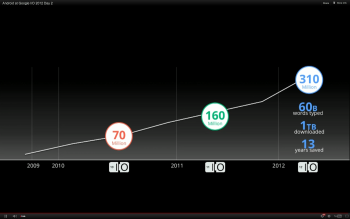
Google says more than 310 million people worldwide now use the Chrome browser.
Google says 310 million people now use its Chrome browser.
Google Chrome browser product manager Brian Rakowski was on stage to announce some new capabilities for developers.
He demonstrated how developers will now be able to easily build voice recognition into their Chrome apps. That will allow users to give commands to their apps without touching touchscreens or typing.
The biggest announcment around Chrome, however, is the news that a version of the Chrome browser for the iPhone and the iPad will become available later today.

Chromebooks Get Faster


The Chromebooks that Google introduced last year were not well received, mainly because of their connection and storage limitations, and because of sluggish performance. But the Google laptops have survived, and Google says the the new Chromebooks are three times faster than the original chromebooks.
They will also become easier to purchase. Chromebooks will soon go on sale in selected Best Buys and other retail outlets across the United States. Google also says it's working with a series of computer makers to release more Chromebooks by the Christmas season.
Cirque du Soleil demonstrated its new HTML5 app, which responds to your body movements detected by your web cam.

The Cloud Gets Bigger

Google says that its cloud infrastructure is now so powerful and scalable that developers can run their apps entirely in the cloud to as many users as they want "for a reasonable price."
This was demonstrated by showing the Google I/O kenote audience an entirely cloud-based gamed called Bulletstorm on a giant screen. The game ran very smoothly in the demo, and the graphics looked great; it looked a lot like a game running on a gaming console.

Very Developer-Oriented Keynote

Unlike yesterday's announcements, the new features and services rolled out today (other than the Drive and Chrome apps announcements), seemed aimed at the developer crowd.
However, the developers in the crowd were treated to a reprise of the skydiving act from yesterday, in which the divers all wore the Google Glass glasses and filmed their descent from the air. Today's show was more of a how-to, hosted by Google founder Sergey Brin, and was noticeably less exciting for consumers than yesterday's spectacle.

Tuesday, June 26, 2012

Firefox for Android Gets a 'Screaming Fast' Upgrade!!

Mozilla on Tuesday rolled out a brand-new version of its popular Firefox browser for Android that's designed to deliver faster performance, a fresh new look, and Flash support, among many new features.
firefox for android
“The new Firefox for Android is a snappy and dynamic upgrade to mobile browsing that makes it faster and easier to get where you want to go on the Web,” reads the official announcement on the Mozilla Blog.
Designed for smartphones running Android 2.2 or later, the new Firefox 14 for Android is now available in the Google Play Market as a free download.
'Dramatic Performance Improvements'

First and foremost among Firefox for Android's new features are significantly faster speeds, Mozilla says.
“We redesigned Firefox for Android to make it a screaming fast and personalized upgrade to mobile browsing that lets you take your Web experience everywhere you go,” Mozilla explains. “You’ll notice dramatic performance improvements that make Firefox on your Android phone super fast with everything from startup and page load times to panning and zooming and Web app performance.”
In fact, Firefox for Android is apparently twice as fast as the stock Android browser on Mozilla's Eideticker benchmark, which measures the user's Web experience. It's also significantly faster on standard industry benchmarks, such as Sunspider.
The video below depicts the software's newly boosted startup time.
<p>Your browser does not support

'The Highest Level of Privacy and Security'
Also included in the new Firefox for Android is a fresh new look and a personalized start page. A new Awesome Screen powered by Firefox Sync delivers all your browsing history, bookmarks, passwords and form data to your Android phone.
Features including tabbed browsing, Firefox Sync, and Firefox Add-ons have now been optimized for mobile browsing, and Flash support means “you can watch videos, play games, and interact with more Web content on your Android phone,” Mozilla notes.
With features including Do Not Track, Master Password, and HTTP Strict Transport Security, meanwhile, Firefox for Android offers “the highest level of privacy and security features in mobile browsing,” the project explains.

New HTML5 Capabilities
Last but not least, new HTML5 capabilities in Firefox for Android allow developers to create rich Web apps and websites based on HTML5, JavaScript, CSS, and other open Web standards.
The video below offers an overview of some of the open source software's key new features. More detail can be found in the official release notes for Firefox for Android.
<p>Your browser does not support iframes.</p>
Do you plan to try out Mozilla's new software? If so, please leave your impressions in the comments.

Thursday, June 14, 2012

Google+ Can Still Beat Facebook!!

Why Google+ Can Still Beat FacebookNow that Facebook has gone public and is nearing an astounding 1 billion members, it’s a good time to ask whether Facebook’s main rival, Google, can compete in the social networking game.
Google said in April that 170 million users had “upgraded to Google+,” but the company has been coy when it comes to specifying how many of those people actually use the social network on a regular basis. Some observers have suggested that it's mainly Google employees and hard-core Google loyalists who actively use the service today.
I still think Google+ can win out against Facebook in the end. But to do that, Google must learn how to play to its own strengths.

Larry PageA lot rides on whether Google can pull that off. For ad targeting, Google can collect the data it needs from the subjects of people’s Web searches and the content of email, but that data isn’t nearly as personal and valuable as the stuff people willingly provide to Facebook every day. Social network data is far more individual and preference-oriented than other kinds of targeting data, and the long-term competitiveness of Google’s advertising business (96.5 percent of its revenue) may depend on Google's ability to get that data.
Larry PageIf anybody has a battle plan for Google+, it’s Larry Page. The Google cofounder and CEO has given some good reasons why Google+ will become a contender, but his reasons seem highly theoretical at this point.

‘Circles’ More Closely Resembles Real Life

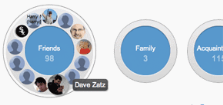
Why Google+ Can Still Beat FacebookPage says that the “Circles” structure in Google+ offers a great way to organize your friendships. He’s right: The Circles design is immediately intuitive; it’s easily understandable, and it works because it replicates the way we manage relationships in real life.
Mark Zuckerberg stresses that you can make “groups” in Facebook to organize friends in the same way. But that functionality was not part of Facebook's original design; the service bolted it on later. And that’s why grouping your friends in Facebook is a far clunkier process than it is in Google+. The Circles concept is central to Google+--in fact, Google+ was originally called “Google Circles.”

Integration With Other Products

The biggest edge that Google+ might have over Facebook hasn’t been exploited nearly as much as it could be. Google's original plan was to build Google+ social networking features and tools into almost all of its existing online services, from search to Docs to video (YouTube).
Why Google+ Can Still Beat FacebookGoogle+ is already integrated into the navigation bar at the top right of almost all Google products; this arrangement lets you monitor all Google+ events (updates, messages, and the like) as well as share content with friends without ever leaving the Google service you happen to be using. And the Google+ client for Android makes it really easy to upload, automatically, any photos you shoot on your phone to a private album on the Google+ servers.
Beyond those features, however, not much has happened since the Google+ site launched last summer. In July 2011, Google was asking users how it could integrate aspects of Google+ into Gmail, and vice versa. What happened with that? I’ve seen no major integration moves announced between the two products. Can I easily launch a Hangout session without leaving the Gmail app? No. Can I receive Gmail inbox notifications in Google+? Not yet.
Millions of people use Google's assorted free services (Gmail, Docs, search, and so on). For Google+ to flourish, Google must bind those services and Google+ functions together. You need to be able to break into an impromptu Hangouts video chat session involving the people you’re collaborating with to build a Google Docs spreadsheet. Your searches, where appropriate, should be much more driven by your social networking preferences and those of your friends.
To compete with Facebook, Google must integrate Google+ with its other killer services so tightly that leaving the Google property you're in and going to Facebook becomes a hassle.
I think Google will eventually execute on this vision. And when it does, it will start to win users away from Facebook. This is a zero-sum game: Most people simply don’t have room in their lives for two separate social networks, a factor that's helping Facebook tremendously right now.

Approach to Privacy

People are becoming increasingly aware that large companies like Google and Facebook are collecting the data they enter online, and using it to target ads or selling it to third parties. The constant media coverage of Facebook’s notoriously poor stewardship of personal data has done a lot to draw consumer attention to the largely hidden ecosystem of companies that collect, buy, sell, and trade in personal data.
For instance, Facebook makes your name, gender, profile picture, networks, friends, “Likes,” wall posts, photos, and profile details public by default, which makes those facts about you searchable.
Why Google+ Can Still Beat FacebookPreviously, you used to be able to set the public-by-default profile picture to private. You no longer can--nor can you change the setting for your name, your cover photos, your networks, your gender, and your Facebook username and user ID.
Facebook has steadily designated more user data as public information because its advertising partners can use the public stuff to target ads on the Facebook site. This data will very likely serve to target Facebook ads on other sites in the near future. And if you don’t want to make these data points public, Facebook says (in effect) that you can’t use Facebook.
The fact is, Facebook is more dependent on personal social networking data than Google+ is. Google is highly reliant on personal data too, but does not need to collect everything in a social networking setting. As people become more aware of the uses of their personal data, they may see the Google+ privacy approach as a reason to switch.

Data Portability

Why Google+ Can Still Beat FacebookIt’s very hard to delete your Facebook data if you decide to quit the service. You can delete your profile, but Facebook makes no promises that it will delete the personal data about you that it already stores on its servers.
Google makes it relatively easy to permanently delete the data you’ve banked at Google+, and walk away. You accomplish this through a Google+ tool called Google Takeout; with just a few clicks, you can download data from your Picasa Web Albums, Google profile, Google+ stream, Buzz, and contacts.

The Battle for Personal Data

Of course only time will tell whether Google can assume the social networking throne. The idea of Google+ having anywhere near as many users as Facebook seems a little far-fetched right now. But I still believe that Facebook is not immune to the shifting tastes of social network users. MySpace seemed unstoppable for a few minutes, but slid downhill quickly after Facebook became the cool place to network.
Google has to leverage its obvious advantages to catch up with Facebook. It must put significant energy into expanding Google+ functionality into all of its most popular services. It must promote killer features like Hangouts to new audiences (such as small businesses). It may need to evangelize about how it is more respectful of personal data, and more trustworthy with that data, than Facebook.
Google might also have to invest some of its great wealth to promote Google+. I still haven’t seen a Google+ commercial on TV, nor have I seen Google offer any rewards for people who cancel Facebook to come over to Google+.
Regardless, Google’s need for personal identity and preference information may soon compel it to take dramatic steps to compete with Facebook.

Tuesday, June 12, 2012

Apple iOS 6 vs. Android vs. Windows Phone Comparison!!

Apple's World Wide Developer Conference (WWDC) kicked off today with the unveiling of iOS 6 for the iPhone and iPad. Apple is promising over 200 new features in the latest version of its mobile operating system, but only a few of them were highlighted in the keynote.

                                      
Download Sexy Girls Wallpapers, Click Hare

June is an exciting month for smartphone fanatics as Microsoft is expected to unveil the next generation of Windows Phone at an event next Wednesday, June 20 while Google is expected to reveal its plans for the next version of Android, codenamed "Jellybean."
While some of the features Apple announced today already exist on competing platforms, Apple is putting its own twist on these updates. For example, Siri, Apple's voice-activated virtual assistant, is even smarter now with support for sports, movies, and restaurants. Siri can also directly launch apps, but you still can't control these third-party apps with your voice.
Apple is also breaking up with Google Maps and launching its own Maps application with iOS 6. It includes local business information, Yelp integration, real-time traffic updates, and turn-by-turn navigation. Naturally, Apple has also added Siri integration to maps so you can ask questions along your journey such as, "Are we there yet?" or "Where's the next gas station?" Apple has also added a 3D/fly-over mode to its Maps application, which shows you detailed 3D models of buildings and landmarks.
 
 
These updates certainly give Microsoft and Android something to chew on. While both competing platforms offer voice-command support, those features are crude in comparison to Siri's artificial intelligence and natural dictation. Microsoft's Bing Maps could definitely use a revamp in the next version of Windows Phone as its turn-by-turn directions feature is quite clunky (you must tap your phone at each turn).
We'll be revisiting this comparison later this month as Microsoft and Google roll out new versions of their respective mobile platforms.

Saturday, May 26, 2012

Google Warns: Clean Your PC OR Lose Internet Access !!

Google has embarked on a final campaign to warn the remaining half million PCs it estimates could still be infected with the DNSChanger malware that they risk losing Internet connectivity on July 9.
Starting this week, any users of Google's search tools who are detected redirecting to DNSChanger's now substituted domains will be splashed the stark warning "Your computer appears to be infected" with an accompanying link offering remediation advice.
"While we expect to notify over 500,000 users within a week, we realize we won't reach every affected user. Some ISPs have been taking their own actions, a few of which will prevent our warning from being displayed on affected devices," said Google's warning. (See also "Protect Yourself From DNSChanger.").
As many as half the users affected by DNSChange do not speak English and had not reacted to warnings already issued by the FBI and others, Google believed.
DNSChanger was the work of an Estonian criminal gang that recruited PCs into the bot without hindrance for several years until being busted by law enforcement Operation Ghost Click in November 2011.

Once infected PCs all browser visits were redirected through the gang's own DNS servers, now kept alive by court direction simply to give infected users time to unhitch themselves from these machines.
Estimates on infection vary but it is believed that at its peak DNSChanger infected four million PCs, including sizable numbers inside large US companies. An original cut-off date of March 8 was extended to July 9 to allow more users to remove the malware.
Given the widespread warnings issued by numerous companies over several months, it is likely that a significant number of users will not react in time. Google's latest campaign follows up on a similar one launched as long ago as last summer.
Advice on dealing with DNSChanger can be found from a number of sources but removing the redicrection might not be the end of a user's troubles - in recent times DNSChanger infection was often accompanied by other forms of malware that will need to be dealt with separately.

Monday, May 21, 2012

Google Chrome Overtakes Internet Explorer !!

Google’s Chrome is now the most popular Web browser worldwide, surpassing Microsoft’s Internet Explorer for the first time, according to the latest figures from StatCounter. After years of slowly chipping away Internet Explorer’s market share, Chrome took the lead with 32.76 percent share, while IE dipped to 31.94 percent.
Just a year ago, Internet Explorer was leading the Web browser market share with 43 percent, followed by Mozilla Firefox with 29 percent, and Chrome was third with 19 percent. Twelve months later, IE has lost 12 percent of the browser market share while Chrome gained 13 percent to the detriment of IE and Firefox, which also lost about 4 percent of its users and now comes in at just over 25 percent.
This is not the first time Chrome has leapfrogged Internet Explorer. For a single day in March, Chrome was estimated to have held a few percentage decimals over IE. This time however, Chrome overtook IE for the entire week, though by still less than a percentage point.
While Chrome is leading the browser market worldwide, in the U.S. it still has a lot of catching up to do. Microsoft’s Internet Explorer still has a wide lead at home with 37 percent, with Chrome a distant second at 23 percent, closely followed by Mozilla Firefox 22 percent.
StatCounter figures are generally reliable, as they are based on data collected from some 15 billion page views around the world. However, these stats can wildly differ from one provider to another, as for example NetMarketShare shows Internet Explorer had 54 percent share this month, while Chrome has 19 percent, and Firefox has 20 percent.