Recent Posts

Showing posts with label Internet. Show all posts

Thursday, August 23, 2012

Improve Your Site's Search Ranking Using SEO!! Tips and Tricks!!

As any website owner knows, search-engine optimization—SEO—is a rapidly moving target. What worked well last week might work against you today. Hordes of website operators learned this the hard way earlier this year, when two key updates to Google’s algorithms took effect. Known by the cute code names of “Panda” and “Penguin,” these updates were designed to severely penalize websites with thin, weak, or duplicated content. The goal: To rid Google’s search results of content farms and spam blogs by using quality metrics, instead of merely relying on the old PageRank system to measure a site’s importance.
The end result has been to force webmasters to do what pros have been advising for years: Stop stuffing keywords into low-grade copy and focus on quality. Unique blogs, images, and video are all increasingly key in today’s Web world.
Of course, more and more scenery, so to speak, accompanies this mandate. Google+ might not yet matter much to most individuals, but it’s becoming more important to search engines, along with Facebook and Twitter links to content. How your site looks and loads on a mobile browser is also increasingly important, as search results are ever more accessed via smartphone.
All of that is merely prologue: If you’re not already working on all of the above, you’re far, far behind. For those already following this advice, now is the time to take a look ahead at what the next 18 months of SEO are likely to bring. We spoke to dozens of experts to get the skinny on SEO for 2013. Here are the top tips we discovered.

This Website Will Disavow Any Knowledge of Your Actions
How to Improve Your Site's Search Ranking using SEO
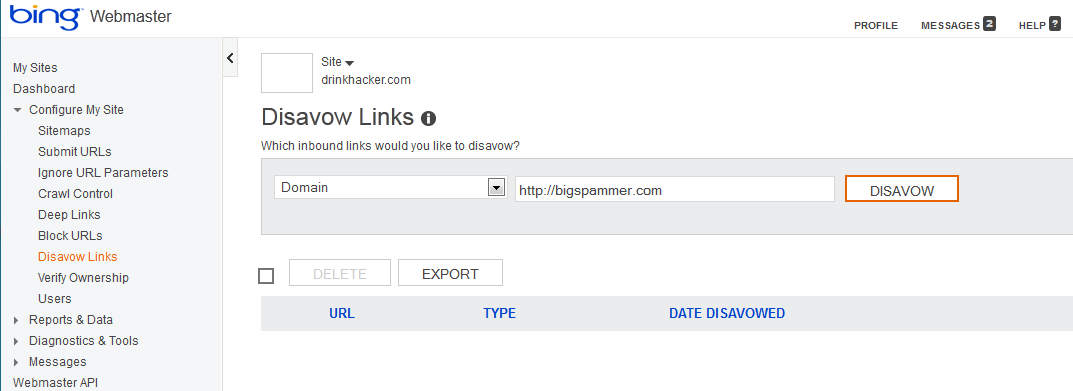
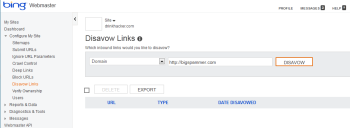
Use this tool to prevent Bing from penalizing your site if spammy sites link to it.What happens if someone links to you from a spammy website? It makes you look bad; in fact, search engines can deem that your site is in fact a spam site as well. Your site is guilty by association, even if you have nothing to do with the linker.
Bing has rolled out a tool in its Webmaster Tools that let you “disavow” links from such places. It’s largely self-explanatory. Just add a page or domain to the tool and click the Disavow button to tell Bing you do not approve. This may improve your site's position in search results, but almost certainly it will help to rid the Web of some of its spam. Google’s “disavow” tool is expected in the coming months.
Carson Ward of Distilled.net (one of several online marketing agencies whose experts we interviewed) says these "disavow" tools will raise a lot of questions for search optimizers. “Will site owners be more likely to use tactics that search engines frown on if they can simply turn and tell search engines to discount the spam they have created? Will search engines trust site owners to crowdsource spam detection, and should they? Google's implementation of a disavow tool will largely determine the future of Web spam.”

It’s Not Where They Link, It’s How They Link

Ryan Draving, CEO of CompeteLeap, stresses that machine-generated writing and “spinning” (rewriting or slightly changing someone else’s content to look original) will become useless or even detrimental to your website, adding, “Search results will begin to shift more and more toward brands, and away from websites built purely for SEO. Brands typically invest in the kind of quality content that generates strong links from, and engagement with, bloggers, other websites, and users on social media networks.”
Those incoming links are still critical, but Draving notes that over-reliance on exact keyword phrases coming into your site (like “Chicago emergency plumber”) will penalize you. Says Draving, “Keep less than 11 percent of external links coming to your website via exact keyword phrases. Google expects to see either your URL or your company name as the link text for the majority of your inbound links. So instead of asking every website to link to you with your favorite keywords ('DIY Internet Marketing'), allow them to use the text they want.”

Don’t Discount Yahoo

It’s long been a habit for website operators to forget about Yahoo, even though Yahoo and Bing combined still have nearly a 30 percent market share. But what happens now in the Marissa Mayer era? Will Yahoo rise again as a search leader? Kaysha Kalkofen, co-founder of tSunela, says, “Keep an eye on Yahoo's relationship with Bing, especially in the paid search space. If that evolves, the paid search market will open up again.”

Take the Credit
How to Improve Your Site's Search Ranking using SEO
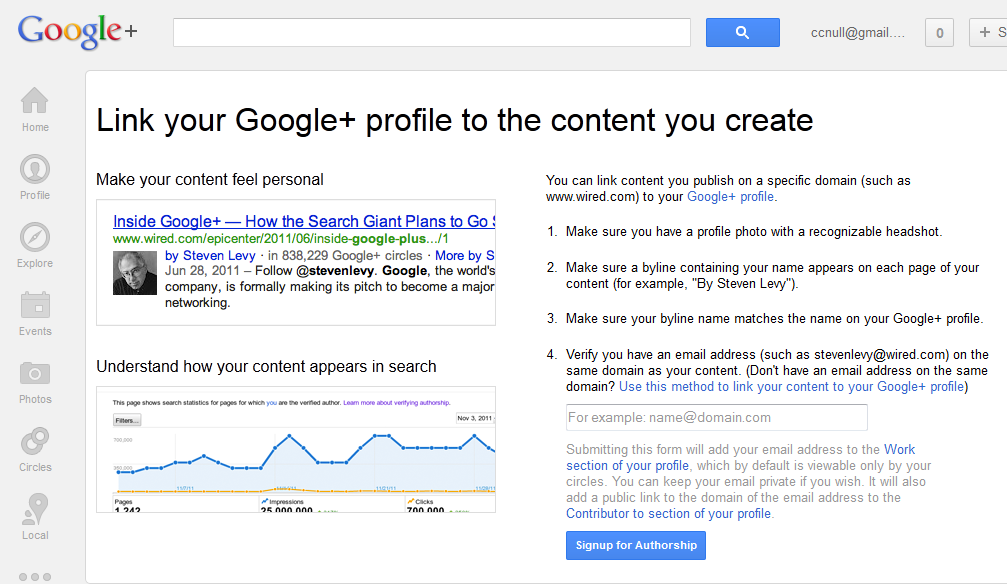
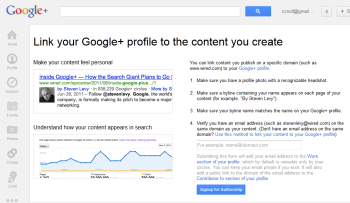
Author rankings could become more important than page rankings in the second half of 2013.Have you ever done a Google search and noticed head shots next to a few of the posts at the top of the results? This is part of an experimental program within Google designed to link authors with published content, regardless of where that content lives.
Jon Payne, President and Founder of Ephricon Web Marketing, explains how “AuthorRank” works: “It’s generally the case that most significant websites have many different authors that contribute to their content. Google is looking at how to trust links from one author versus another, and weight them differently. We see AuthorRank replacing PageRank most likely in the latter half of 2013. Businesses must set up the ability to claim authorship of their content, but the process is pretty easy and (not surprisingly) is mostly handled within Google+.” To get started with the process, get your Google+ profile up to snuff (you must have a recognizable face-shot photo as your profile picture) and check out plus.google.com/authorship.
How to Improve Your Site's Search Ranking using SEO

Seek Out Snippets

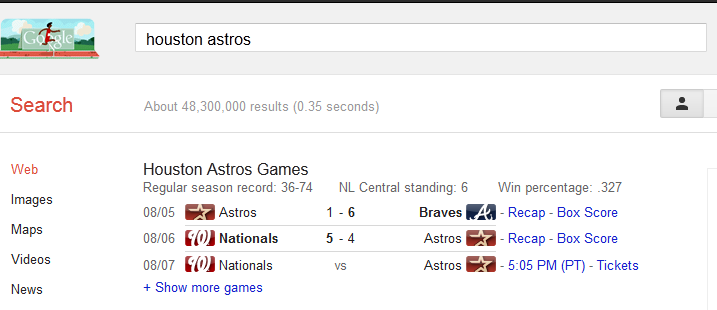
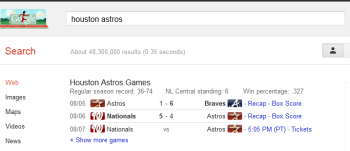
Structured information, known as "rich snippets," can help your site float to the top of search results. In related news, you may also notice that when you search Google, little tidbits of information float up to the top: Search for a baseball team, for example, and their current record and recent games will appear first. These are called “rich snippets,” a form of structured information that can get your content to the top of search results.
David Erickson, publisher of the e-Strategy blog, says, “Webmasters should take a look at their search results and those of their competitors to see if any of the listed sites are accompanied by rich snippets. If so, I'd take a look at the type of structured information being included in those results and see if you can include such information on your own site. If you're using WordPress, there are often plug-ins available that help ease the formatting of such information.”

Publish More Than You Think You Should

The days of weekly updates are over. Google is increasingly favoring fresh content, and that means publishing not just daily but multiple times per day if possible. Nicholas E. Kinports, Digital Strategy Lead of lonelybrand, says, “Digital marketers should create and stick to an editorial calendar that provides for new content several times per day that is unique and industry-focused. That content should be woven throughout Web and app pages to create a dynamic ecosystem.”

How to Improve Your Site's Search Ranking using SEO
Updating your site frequently is one sure way of boosting your search engine ranking.
This makes logical sense in the Twitter era, says Josh Gross, SEO specialist with Coalition Technologies, who adds, “A website that more frequently updates its content is likely to be more relevant then a website that only makes periodic updates.”
Google Gets in the Shopping Game

Google Shopping has long been a small yet significant way for merchants to drive traffic directly to their products without having to buy an ad. That’s about to change: Google Shopping is going pay-for-play (via a system much like AdWords), which means that the days of free product links are coming to an end. It’s too early to say how expensive this might end up being, but for now, says Jeff Soukotta, Founder of Adaptise, e-commerce site operators should prepare to become familiar with the changes and start thinking about budgets.

Speed Matters

In the quest to make websites more feature-filled and social, website operators often saddle their sites with scripts and plug-ins that take their toll on how quickly the site loads. A slow site isn’t a monumental thing, but users hate sites that won’t load. As a consequence, Google is increasingly becoming interested in the topic, and it’s likely to play a more important role in rankings down the line. As Tom Hughes-Croucher, Principal of Jetpacks for Dinosaurs, sums it up, “In effect, Google isn't just looking for the most keywords per landing page, it is looking for the best landing page experience for users.”

Tuesday, August 7, 2012

Ways to Get the Most From Your Wi-Fi-Only !!

Much to the chagrin (and much against the ill wishes) of wireless carriers such as AT&T, Verizon, Sprint, and T-Mobile, people are buying Wi-Fi-only tablets. In fact, some studies have shown that in 2011 up to 90 percent of all tablets sold in the United States relied on Wi-Fi, rather than on 3G or 4G LTE.
I hate to say it, AT&T, but this makes sense: Wi-Fi only tablets are cheaper (and I'm not talking exclusively about the Wi-Fi-only iPad, but also about tablets that never had a data option, such as the Kindle Fire and the Nexus 7), and people are discovering that they just don't need an extra data plan. Don't believe me? Check out these 10 tips for getting the most out of your Wi-Fi-only tablet.

1. Tether, Tether, Tether

If you already have a smartphone with a data plan, you don't need to waste money on an additional plan for your tablet. Instead, use your phone's plan to get an Internet connection for both devices.
There are two ways to tether, or turn you phone into an Internet hotspot, using today's smartphones.
PdaNet tethering app
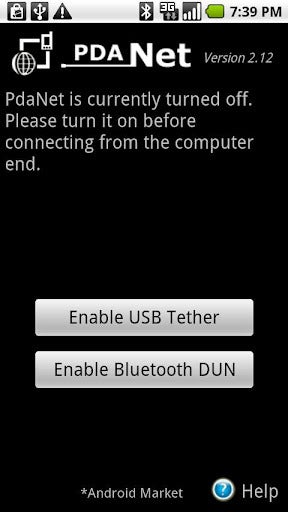
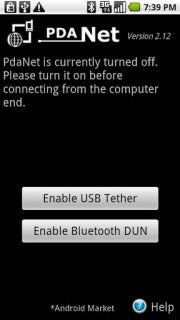
PdaNet tethering appOne option is to use your phone's built-in tethering ability, which means you'll likely have to pay your carrier an extra fee for the service. The other is to download a third-party tethering app such as PdaNet (for nonrooted Android phones), Wireless Tether for Root Users (for rooted Android phones), or PdaNet for iPhone (for jailbroken phones).
The only problem with tethering is that carriers do their utmost to discourage it. If you use your phone's default tethering ability, you'll have to pay your carrier a fee of around $20 for the privilege. That's $20 on top of your already pricey data plan--and you don't get any extra data.
And if you use a third-party tethering app, your carrier can charge you if it finds out (unless you happen to be on Verizon). And only jailbroken iPhones can run third-party tethering apps.
But jailbreaking, rooting, or paying a monthly fee may be a small price to pay for the freedom to use your Wi-Fi only tablet (and other devices, such as your laptop) wherever you can use your phone.

2. Get a Mobile Hotspot

Instead of tethering your tablet to your phone's data plan, you may want to consider picking up a mobile hotspot from your local wireless carrier.
A dedicated mobile hotspot can yield better results than tethering your phone's data connection. For starters, it's often faster and more reliable than a tethered phone's connection. And whereas tethering can drain a phone's battery quickly, mobile hotspots commonly deliver many hours of battery life.
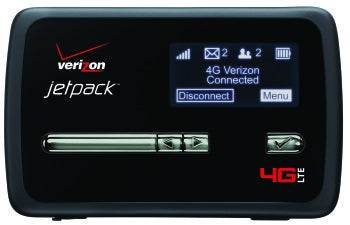
Verizon Jetpack 4G LTE Mobile Hotspot MiFi 4620L
Verizon Jetpack 4G LTE Mobile Hotspot MiFi 4620L I use the Novatel Wireless MiFi 4510L for Verizon LTE, which offers long battery life, excellent data speeds, and a solid connection--unlike my Galaxy Nexus phone.
Though the MiFi 4510L lost out in PCWorld's hotspot tests to the Samsung 4G LTE Mobile Hotspot, the main advantage of the MiFi 4510L is its ability to keep its connection while moving. The Samsung 4G LTE is speedier when you're sitting still, but, in my hands-on experience, the MiFi 4510L maintained a solid connection on a 9-hour drive to Vegas (our PCWorld tests didn't evaluate this capability).

3. Preload Magazines and Books

Tablets are the perfect travel device--they're lightweight, they have large screens, and you don't need to take them out of your bag during a TSA search. Tablets are also great because they let you carry around tons of reading material without weighing down your bag.
So the next time you head out of town (or go to the gym or hop on the train for your morning commute), try preloading some magazines and books on your Wi-Fi-only tablet so you can read at your leisure--without an Internet connection.
Zinio reading app
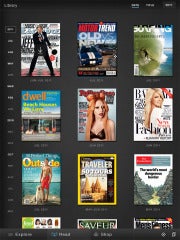
Zinio reading appZinio (for Android and iPad) is an excellent reading app that lets you subscribe to hundreds of magazines (in full color). Sure, you have to pay for the subscription (which isn't much cheaper than a print subscription), but you can download entire magazines before you leave your Wi-Fi zone.
The Amazon Kindle app (Android and iPad) is a great reading app--not just because you can download and read ebooks from Amazon's online store, but because you have free access to tons of ebooks from your local library. Find out whether your library participates by searching OverDrive.

4. Use Offline Mapping Apps

Mapping applications on smartphones and tablets have made getting lost practically obsolete (practically...), but such apps only apply to devices that have constant data connections, right? Wrong--thanks to offline mapping apps, you can stay on track wherever you are, data connection or not.
For a couple of years now, Google Maps has had an offline-viewing option that can even offer turn-by-turn directions without connecting to a network (providing that you've already looked up the route).
City Maps 2Go

City Maps 2GoIf you're heading to a new city and you aren't sure when you'll be able to grab a Wi-Fi connection, try a mapping app such as City Maps 2Go (Android and iPad), which costs $1 to $2. This app lets you download thousands of maps for offline viewing (the iPad version currently has a promo for unlimited downloads, while the Android version offers five free downloads).

5. Read It Later

Suppose that you like to read Web pages--not magazines and books--on your tablet. Instead of letting your lack of Internet connection frustrate you, try using a service such as Pocket, formerly known as Read It Later.
Pocket lets you save Web pages from your computer, by email, or directly from select apps to a special Read It Later list. Once you've saved something to your list, you can open it from any of your devices, assuming that you've connected to the Internet long enough for your list to update.
Download the Pocket app for Android, iPad, or Kindle Fire, and read all of those webpages later on--without an Internet connection. 

6. Use Free Texting Apps

Having a Wi-Fi-only tablet with no phone service or data plan doesn't mean that you can't text your friends with the best of them.
Admittedly, texting on a Wi-Fi-only device doesn't make a lot sense for most people--after all, texting is normally used for instant communication, so it doesn't make a lot of sense to have to find a Wi-Fi connection before you can check your text messages--but some people do text casually. Plus, this approach will save you some money.
TextPlus Android app for texting
TextPlus Android app for textingOne free texting app, TextPlus (Android, iPad, Kindle Fire) lets you text any U.S. or Canadian number for free. Similarly, Pinger's Textfree (Android, iPad, Kindle Fire) lets you text to tons of countries for free, and it has the added benefit of giving you a real phone number so you can pretend that you really have a phone (and so your friends can text back to a phone number, instead of to an email address).

7. Load Up on Tablet-Optimized Offline Games

Mobile games are hot these days, but the hottest ones always seem to require a constant data connection. You can't play social games such as Zynga's FarmVille or Words With Friends unless you're connected to the Internet, which is fine unless you happen to have a Wi-Fi-only tablet and you're in a Wi-Fi-less area.
Osmos HD Android game
Osmos HD Android gameTo deal with that situation, try some tablet-optimized games that don't require an Internet connection--many games in the action/adventure, hidden-object, and puzzle genres don't. Titles worth checking out include the gorgeous puzzle game Osmos HD (Android, $3; iPad, $5); Shadowgun THD (Android, $5; iPad, $5), a third-person outer-space shooter; Dead Space (Android, $7, iPad, $10), a first-person horror survival game; and Empress of the Deep (Android, $4; iPad, $5), a hidden-object game.

8. Share Files Between Devices Wirelessly

Sending files between your Wi-Fi-only tablet and your computer can be extremely easy if you use an app such as WiFi Files (iPad) or WiFi File Explorer Pro (Android/Kindle Fire, $1).
These apps let you wirelessly transfer files between your tablet and your computer via a Wi-Fi connection. Note: Such transfers are faster and less complicated than (for example) emailing a file to yourself.
You can also check out syncing apps, such as SugarSync (Android and iPad) and Dropbox (Android and iPad), which automatically sync your selected files with all of your devices whenever you're connected to the Internet.

9. Find a Wi-Fi Connection

Finding a Wi-Fi connection usually isn't very difficult, but many popular dedicated apps such as Wi-Fi Finder require an Internet connection in order to search for a Wi-Fi hotspot. Obviously, if you're working with a Wi-Fi-only tablet, that prerequisite won't fly.
Wi-Fi Analyzer Android app
Wi-Fi Analyzer Android appInstead, check out apps such as Wi-Fi Analyzer (Android) and WiFi Scanner (Android) to see nearby networks and their signal strengths. (iPad users have a harder time of it because Apple pulls Wi-Fi scanning apps from the App Store; consequently, the only alternative is to jailbreak your phone.)
WiCall Android app
Want to know whether a "free" Wi-Fi network actually requires a browser log-in? Check out WiFi Browser Login (Android), which notifies you if the Wi-Fi network that you just connected to is about to shut you down when you open a browser window.

10. Use Wi-Fi to Make Phone Calls

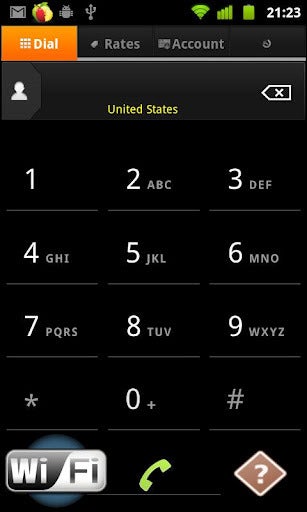
WiCall Android appAssuming that you never make calls on the road, maybe you can get rid of your pesky cellphone plan altogether--and use your Wi-Fi-only tablet to make phone calls through a service such as WiCall (Android), which lets you call over your wireless connection.
These calls aren't free--they cost $0.009 per minute for U.S. calls--but that's a pretty negligible charge. If you'd prefer to pay up front, you can sign up for a service such as GrooVe IP (Android, $5), which lets you use your Google Voice account to make free phone calls.
iPad users can check out the free MagicJack, which allows you to make free phone calls to any U.S. or Canadian phone number.

Data Plans--Who Needs 'Em?

Considering all of the things that a tablet can do without a data connection, it's no wonder that people are overwhelmingly choosing to purchase Wi-Fi-only models. 3G/4G tablets cost more, they require an extra data plan, and they will incur an extra charge on the new shared data plans.
In contrast, you can do just about everything you need to do (except, perhaps, answer emails on the fly or make phone calls on the road) with a Wi-Fi-only tablet. And if you ever do need an Internet connection, you can tether your tablet to your phone or sniff out a wireless hotspot.

Tuesday, June 26, 2012

Firefox for Android Gets a 'Screaming Fast' Upgrade!!

Mozilla on Tuesday rolled out a brand-new version of its popular Firefox browser for Android that's designed to deliver faster performance, a fresh new look, and Flash support, among many new features.
firefox for android
“The new Firefox for Android is a snappy and dynamic upgrade to mobile browsing that makes it faster and easier to get where you want to go on the Web,” reads the official announcement on the Mozilla Blog.
Designed for smartphones running Android 2.2 or later, the new Firefox 14 for Android is now available in the Google Play Market as a free download.
'Dramatic Performance Improvements'

First and foremost among Firefox for Android's new features are significantly faster speeds, Mozilla says.
“We redesigned Firefox for Android to make it a screaming fast and personalized upgrade to mobile browsing that lets you take your Web experience everywhere you go,” Mozilla explains. “You’ll notice dramatic performance improvements that make Firefox on your Android phone super fast with everything from startup and page load times to panning and zooming and Web app performance.”
In fact, Firefox for Android is apparently twice as fast as the stock Android browser on Mozilla's Eideticker benchmark, which measures the user's Web experience. It's also significantly faster on standard industry benchmarks, such as Sunspider.
The video below depicts the software's newly boosted startup time.
<p>Your browser does not support

'The Highest Level of Privacy and Security'
Also included in the new Firefox for Android is a fresh new look and a personalized start page. A new Awesome Screen powered by Firefox Sync delivers all your browsing history, bookmarks, passwords and form data to your Android phone.
Features including tabbed browsing, Firefox Sync, and Firefox Add-ons have now been optimized for mobile browsing, and Flash support means “you can watch videos, play games, and interact with more Web content on your Android phone,” Mozilla notes.
With features including Do Not Track, Master Password, and HTTP Strict Transport Security, meanwhile, Firefox for Android offers “the highest level of privacy and security features in mobile browsing,” the project explains.

New HTML5 Capabilities
Last but not least, new HTML5 capabilities in Firefox for Android allow developers to create rich Web apps and websites based on HTML5, JavaScript, CSS, and other open Web standards.
The video below offers an overview of some of the open source software's key new features. More detail can be found in the official release notes for Firefox for Android.
<p>Your browser does not support iframes.</p>
Do you plan to try out Mozilla's new software? If so, please leave your impressions in the comments.

Thursday, June 14, 2012

Google+ Can Still Beat Facebook!!

Why Google+ Can Still Beat FacebookNow that Facebook has gone public and is nearing an astounding 1 billion members, it’s a good time to ask whether Facebook’s main rival, Google, can compete in the social networking game.
Google said in April that 170 million users had “upgraded to Google+,” but the company has been coy when it comes to specifying how many of those people actually use the social network on a regular basis. Some observers have suggested that it's mainly Google employees and hard-core Google loyalists who actively use the service today.
I still think Google+ can win out against Facebook in the end. But to do that, Google must learn how to play to its own strengths.

Larry PageA lot rides on whether Google can pull that off. For ad targeting, Google can collect the data it needs from the subjects of people’s Web searches and the content of email, but that data isn’t nearly as personal and valuable as the stuff people willingly provide to Facebook every day. Social network data is far more individual and preference-oriented than other kinds of targeting data, and the long-term competitiveness of Google’s advertising business (96.5 percent of its revenue) may depend on Google's ability to get that data.
Larry PageIf anybody has a battle plan for Google+, it’s Larry Page. The Google cofounder and CEO has given some good reasons why Google+ will become a contender, but his reasons seem highly theoretical at this point.

‘Circles’ More Closely Resembles Real Life

Why Google+ Can Still Beat FacebookPage says that the “Circles” structure in Google+ offers a great way to organize your friendships. He’s right: The Circles design is immediately intuitive; it’s easily understandable, and it works because it replicates the way we manage relationships in real life.
Mark Zuckerberg stresses that you can make “groups” in Facebook to organize friends in the same way. But that functionality was not part of Facebook's original design; the service bolted it on later. And that’s why grouping your friends in Facebook is a far clunkier process than it is in Google+. The Circles concept is central to Google+--in fact, Google+ was originally called “Google Circles.”

Integration With Other Products

The biggest edge that Google+ might have over Facebook hasn’t been exploited nearly as much as it could be. Google's original plan was to build Google+ social networking features and tools into almost all of its existing online services, from search to Docs to video (YouTube).
Why Google+ Can Still Beat FacebookGoogle+ is already integrated into the navigation bar at the top right of almost all Google products; this arrangement lets you monitor all Google+ events (updates, messages, and the like) as well as share content with friends without ever leaving the Google service you happen to be using. And the Google+ client for Android makes it really easy to upload, automatically, any photos you shoot on your phone to a private album on the Google+ servers.
Beyond those features, however, not much has happened since the Google+ site launched last summer. In July 2011, Google was asking users how it could integrate aspects of Google+ into Gmail, and vice versa. What happened with that? I’ve seen no major integration moves announced between the two products. Can I easily launch a Hangout session without leaving the Gmail app? No. Can I receive Gmail inbox notifications in Google+? Not yet.
Millions of people use Google's assorted free services (Gmail, Docs, search, and so on). For Google+ to flourish, Google must bind those services and Google+ functions together. You need to be able to break into an impromptu Hangouts video chat session involving the people you’re collaborating with to build a Google Docs spreadsheet. Your searches, where appropriate, should be much more driven by your social networking preferences and those of your friends.
To compete with Facebook, Google must integrate Google+ with its other killer services so tightly that leaving the Google property you're in and going to Facebook becomes a hassle.
I think Google will eventually execute on this vision. And when it does, it will start to win users away from Facebook. This is a zero-sum game: Most people simply don’t have room in their lives for two separate social networks, a factor that's helping Facebook tremendously right now.

Approach to Privacy

People are becoming increasingly aware that large companies like Google and Facebook are collecting the data they enter online, and using it to target ads or selling it to third parties. The constant media coverage of Facebook’s notoriously poor stewardship of personal data has done a lot to draw consumer attention to the largely hidden ecosystem of companies that collect, buy, sell, and trade in personal data.
For instance, Facebook makes your name, gender, profile picture, networks, friends, “Likes,” wall posts, photos, and profile details public by default, which makes those facts about you searchable.
Why Google+ Can Still Beat FacebookPreviously, you used to be able to set the public-by-default profile picture to private. You no longer can--nor can you change the setting for your name, your cover photos, your networks, your gender, and your Facebook username and user ID.
Facebook has steadily designated more user data as public information because its advertising partners can use the public stuff to target ads on the Facebook site. This data will very likely serve to target Facebook ads on other sites in the near future. And if you don’t want to make these data points public, Facebook says (in effect) that you can’t use Facebook.
The fact is, Facebook is more dependent on personal social networking data than Google+ is. Google is highly reliant on personal data too, but does not need to collect everything in a social networking setting. As people become more aware of the uses of their personal data, they may see the Google+ privacy approach as a reason to switch.

Data Portability

Why Google+ Can Still Beat FacebookIt’s very hard to delete your Facebook data if you decide to quit the service. You can delete your profile, but Facebook makes no promises that it will delete the personal data about you that it already stores on its servers.
Google makes it relatively easy to permanently delete the data you’ve banked at Google+, and walk away. You accomplish this through a Google+ tool called Google Takeout; with just a few clicks, you can download data from your Picasa Web Albums, Google profile, Google+ stream, Buzz, and contacts.

The Battle for Personal Data

Of course only time will tell whether Google can assume the social networking throne. The idea of Google+ having anywhere near as many users as Facebook seems a little far-fetched right now. But I still believe that Facebook is not immune to the shifting tastes of social network users. MySpace seemed unstoppable for a few minutes, but slid downhill quickly after Facebook became the cool place to network.
Google has to leverage its obvious advantages to catch up with Facebook. It must put significant energy into expanding Google+ functionality into all of its most popular services. It must promote killer features like Hangouts to new audiences (such as small businesses). It may need to evangelize about how it is more respectful of personal data, and more trustworthy with that data, than Facebook.
Google might also have to invest some of its great wealth to promote Google+. I still haven’t seen a Google+ commercial on TV, nor have I seen Google offer any rewards for people who cancel Facebook to come over to Google+.
Regardless, Google’s need for personal identity and preference information may soon compel it to take dramatic steps to compete with Facebook.

Sunday, June 10, 2012

Adobe Patches Critical Flash Bugs, Ships Sandboxed Plug-in for Firefox !!

Adobe today patched seven critical vulnerabilities in Flash Player -- the fifth security update so far in 2012 -- and released a sandboxed plug-in for Mozilla's Firefox.
The new Flash Player silent updater for OS X is set to automatically install future updates in the background.The company also released the "silent update" tool for OS X, and said it had prepped Flash for the upcoming OS X 10.8, aka Mountain Lion, by signing its code, a requirement if users are to install software downloaded from sources other than Apple's own Mac App Store.
"These updates address vulnerabilities that could cause a crash and potentially allow an attacker to take control of the affected system," said Adobe in an advisory published Friday.
The flaws were all over the map, and included memory corruption, integer and stack overflow, and security bypass bugs. One of the seven was tagged as a "binary planting" vulnerability in the Flash installer.
"Binary planting" is a synonym for what others call "DLL load hijacking," a bug class first uncovered nearly two years ago by HD Moore, chief security officer at Rapid7 and creator of the open-source Metasploit penetration-testing toolkit.
Because many Windows applications don't call DLLs using a full path name, instead using only the filename, hackers can trick an application into loading a malicious file with the same title as a required DLL.
Unlike the last Flash security update, which Adobe issued May 4, today's bug patches are for vulnerabilities that the company has not seen exploited in the wild.
Among those Adobe credited for reporting the vulnerabilities was a researcher from the Google Chrome team, another from Symantec and two engineers who work for Microsoft.
Microsoft and Adobe have been working even closer than usual of late: Last week, Microsoft announced that it had, with Adobe's help, integrated Flash Player into the Metro version of Internet Explorer 10 (IE10).
That move seemed to contradict Microsoft's earlier promise that it would not allow plug-ins -- Flash Player is probably the most widely-used browser plug-in on the planet -- in IE10 on Metro, the new tablet-oriented user interface (UI) within Windows 8 and the sole mode on Windows RT.
Also included in Flash Player 11.3 was a sandboxed plug-in for Firefox and the promised silent update tool for OS X users.
Adobe first talked about sandboxing Flash for Firefox in February, when it released a beta version of the plug-in for that browser on Windows Vista and Windows 7.
The new Flash Player silent updater for OS X is set to automatically install future updates in the background.
A sandbox isolates processes on the computer, preventing, or at least hindering, hackers trying to exploit an unpatched vulnerability, escalate privileges and push malware onto the machine.
Adobe first sandboxed Flash Player for Google's Chrome in late 2010 after working with Google engineers; the sandboxed plug-in for Firefox came after similar cooperation from Mozilla engineers, Adobe said several months ago.
The Mac background updater debuted just over a month ago in a beta version of Flash Player 11.3, but went final today. The tool is identical to the Windows version, which Adobe launched in March: It pings Adobe's servers every hour until it gets a response. If it reaches Adobe and finds no ready update, the tool re-checks the servers 24 hours later. Found updates, however, are applied entirely in the background, and do not display notices on the screen or require the user to take any action.
By default, Flash 11.3 has silent updates switched on for OS X users, but they can change the setting to continue to receive on-screen alerts, or more dangerously, decline all updates.
Adobe has also prepared Flash Player for the release of Apple's next desktop operating system, Mountain Lion.
Mountain Lion includes a new feature called Gatekeeper that by default will let users install only software downloaded from the Mac App Store -- the Apple-curated market that debuted in January 2011 -- or signed with certificates Apple provides free-of-charge to registered developers.
Gatekeeper is Apple's reaction to last year's spread of the Mac Defender malware, which was tucked into fake security software: Gatekeeper will prevent such "scareware" from ending up on Macs.
"Starting with Flash Player 11.3, Adobe has started signing releases for Mac OS X using an Apple Developer ID certificate," said Brad Arkin, Adobe's senior director of security, products and services, on a company blog today. "Therefore, if the Gatekeeper setting is set to 'Mac App Store and identified developers,' end-users will be able to install Flash Player without being blocked."
Because Flash is not distributed through Apple's desktop app market, if users set Gatekeeper to the most restrictive option -- "Mac App Store" -- they won't be able to install or update Flash Player.
Flash Player was upgraded Friday to version 11.3 for Windows and OS X, to 11.2 for Linux and to 11.1 for Android. As of 3 p.m. ET, Google had yet to update Chrome, which includes its own version of Flash, to gives its users the patched edition.
Gregg Keizer covers Microsoft, security issues, Apple, Web browsers and general technology breaking news for Computerworld. Follow Gregg on Twitter at @gkeizer, on Google+ or subscribe to Gregg's RSS feed. His email address is gkeizer@computerworld.com.
See more by Gregg Keizer on Computerworld.com.
Read more about malware and vulnerabilities in Computerworld's Malware and Vulnerabilities Topic Center.

Friday, June 8, 2012

Why You Don't Need to Work in an Office Again !!

How to Ditch Your Office for Good The virtual workforce. Telecommuting. Mobility baked into everything. The cloud.
Nearly all the big trends facing small companies doing business in the '10s speak to the increasing irrelevance of one of the hallmarks of the working world: the office.
We’ve all worked there, whether we had an individual office with a window and a door, or just a small patch of carpet in a sea of cubicles. And generally an office isn’t a bad place to spend the day: It has climate control, an IT department to fix problems, and sometimes even free coffee. But most of all, offices offer camaraderie, and the chance for employees to have impromptu meetings and bounce ideas off one another.
Unfortunately, offices are also terribly, terribly expensive. Even in the down economy, real estate in a prime area such as midtown Manhattan can cost $50 per square foot per month and up, and that’s not including utilities, furniture, and build-out expenses.
So maybe you don’t need an office after all. With a largely mobile workforce that is often working from home, a car, or a nearby cafĂ©, what’s the point of stocking a fridge that no one will ever use? Why not ditch the office for good and go 100 percent office-free?
Many people already do this, but if your job involves more than just tapping away on your laptop and making the occasional phone call, running a company without an office can be challenging.
Here are the big issues--and how to address them.

Dealing With Employees

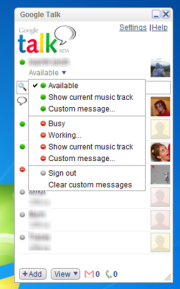
Instant messaging services, such as Google Talk or AIM, are great tools for communicating with--and keeping track of--far-flung employees.
How to Ditch Your Office for Good
One of the biggest fears that many employers have about telecommuting is the worry that remote employees won’t do their jobs. Leave staffers alone at home all day, and they’ll just watch TV, do the laundry, or play hooky, leaving you to foot the bill for a day off. Those concerns seem to be misplaced, however. In fact, some studies have shown that employees who have more flexibility (including telecommuting options) work harder and longer than if they were at the office. This is why many employers are happy to outfit their staff with smartphones and laptops: A mobile device makes it incredibly easy to take your work home with you.
Of course, managing remote employees isn't always smooth sailing, and it's quite possible that your key people will decide to take a long lunch when you need them the most. The solution is largely one of setting expectations. Even if your employees are never in the office, they need to know that you expect them to act as if they were. Set working hours and a specific lunchtime if necessary, and require your staff to stick to the schedule. This policy should be in writing, either in a person's offer letter or as part of your employee handbook. If employees can't stick to the schedule for some reason, tell them that they need to let you know well in advance. An office employee wouldn’t think of leaving for a doctor’s appointment without notifying the boss, and there’s no reason a remote worker should do so either.
Making the rules of remote working crystal clear should mitigate most management problems.

Communication

Another big challenge with remote work involves communicating. You can’t just walk over and drop a file on a junior staffer’s desk or round up a few people for a quick meeting. So how do you keep in touch, and keep everyone on the same page?
Instant messaging has been the communications medium of choice for most virtual or far-flung organizations. Choose a platform, and require all staffers to sign in to their account at the beginning of each workday. If employees aren’t going to be available for a while, whether it’s for lunch or other duties, have them update their IM status to reflect where they are and when they’ll be back.
How to Ditch Your Office for Good
OoVoo offers an inexpensive videoconferencing service for as many as 12 participants; in fact, it's free if you can tolerate ads.Of course, having a workable phone network is critical too. Although many people have forsaken landlines these days, if employees’ cell phone reception isn’t perfect, they’ll need to change networks, acquire a VoIP system, or even invest in old-school wires. As a small-business owner, you may have to pay for some or all of this expense.
If you want to get really advanced, you can look into having group video chats with your staff. OoVoo supports video chats with up to 12 participants (free with ads; $3 per user per month without ads). Skype Premium supports up to 10 simultaneous participants for $5 per user per month. Just make sure everyone has a very fast network connection.

Thursday, June 7, 2012

LinkedIn Hacked : What You Need to Know ?

LinkedIn users awoke to a nasty surprise today as word spread that hackers breached LinkedIn's servers and leaked passwords for nearly 6.5 million user accounts. LinkedIn didn't acknowledge the hack until midday Wednesday afternoon, when the company finally confirmed that a certain number of member passwords had indeed been compromised.

Who's Behind the Hack?


A user on a public Russian forum is taking credit for the hack, but no one has been able to verify if he or she is really behind this whole mess.

When Did the Hack Take Place?


We don't know when the hack took place, but according to Ars Technica, the hackers posted the data over the course of three days.

What, Exactly, Was Released?


The user posted approximately 6.5 million hashed passwords to the forum, and according to security software firm Sophos, at least 60 percent of those passwords have already been cracked. Thus far no usernames have been released, which either can mean that the hackers didn't manage to download them or they are keeping the usernames for themselves. Either way, that's a lot of leaked private data.

So Is My Account Compromised?


Yes and no. The passwords were all hashed using SHA-1 and so they won't be readable outright. Unfortunately SHA-1 isn't entirely foolproof and can still be cracked through the use of brute-force attacks. These would require the attacker to insert several million words or phrases into the SHA-1 algorithm and compare the results against the list of leaked passwords. Since we don't know whether or not the hackers have usernames as well, it's best to assume the worst and consider your account hacked.

What's the Worst That Can Happen?


For one thing, hackers would have control of your account and contacts. If you use the same username and password combo on other sites, then there is a risk that those accounts are now compromised as well.

What About LinkedIn Pro Users? Do I Need to Worry About My Credit Card Info?


LinkedIn hasn't said anything about whether any financial information associated with LinkedIn pro accounts was compromised, so we don't yet know for certain. In either case, you should always keep a close eye on your financial statements to make sure that nobody is using your accounts without your authorization.

What Can I Do Protect Myself?

 In a blog post, LinkedIn says that it will email all the users whose accounts were affected by the hack and give them instructions as to what to do next. The company warns that you should not click on any email links asking you to change your password, as that could be someone attempting to steal your information.


If you used the same password or username on other websites (which you really shouldn't do), it might be a good idea to good ahead and change those for good measure. If you need help in building a better password, check out our comprehensive guide on the matter.

For still more tips, see our overview of what to do if you ever become a victim of a data breach. So change your passwords, don't click on any suspicious links, and stay safe out there, folks.

Saturday, May 26, 2012

Google Warns: Clean Your PC OR Lose Internet Access !!

Google has embarked on a final campaign to warn the remaining half million PCs it estimates could still be infected with the DNSChanger malware that they risk losing Internet connectivity on July 9.
Starting this week, any users of Google's search tools who are detected redirecting to DNSChanger's now substituted domains will be splashed the stark warning "Your computer appears to be infected" with an accompanying link offering remediation advice.
"While we expect to notify over 500,000 users within a week, we realize we won't reach every affected user. Some ISPs have been taking their own actions, a few of which will prevent our warning from being displayed on affected devices," said Google's warning. (See also "Protect Yourself From DNSChanger.").
As many as half the users affected by DNSChange do not speak English and had not reacted to warnings already issued by the FBI and others, Google believed.
DNSChanger was the work of an Estonian criminal gang that recruited PCs into the bot without hindrance for several years until being busted by law enforcement Operation Ghost Click in November 2011.

Once infected PCs all browser visits were redirected through the gang's own DNS servers, now kept alive by court direction simply to give infected users time to unhitch themselves from these machines.
Estimates on infection vary but it is believed that at its peak DNSChanger infected four million PCs, including sizable numbers inside large US companies. An original cut-off date of March 8 was extended to July 9 to allow more users to remove the malware.
Given the widespread warnings issued by numerous companies over several months, it is likely that a significant number of users will not react in time. Google's latest campaign follows up on a similar one launched as long ago as last summer.
Advice on dealing with DNSChanger can be found from a number of sources but removing the redicrection might not be the end of a user's troubles - in recent times DNSChanger infection was often accompanied by other forms of malware that will need to be dealt with separately.

Friday, May 25, 2012

Yahoo’s New Browser Axis !!

Yahoo on Thursday introduced a new browser plugin for desktop computers as well as an iOS browser called Axis. Yahoo’s browser is not meant to be a replacement for Chrome, Firefox or Internet explorer on desktop computers. Instead, Axis is what Yahoo calls a “search browser”, which is basically a plugin to visually display search results served by the search engine.
Yahoo Axis is available for desktop computers as a free plug-in for versions of Internet Explorer, Safari, Firefox and the Chrome Web browsers. On mobile devices, Axis is available as a stand-alone iPhone and iPad app, while an Android version should come later, Yahoo said. I specifically tried out Axis on a new iPad and on a desktop browser.
Yahoo Axis For Desktop
Yahoo has made it very easy to install Axis for your desktop browser. You just go to the Axis website and pressing the “Get it Now” button will start the download for the plugin appropriate to your browser. Once installed, you will see a black search bar at the bottom of the browser window.
As you start typing, the bar is raised and displays underneath a list of suggested search terms and towards the right it will display horizontally scrolling thumbnails of the pages in the search results, while sites without thumbnails will show just text. The thumbnails are quite blurry and low res. Once you click on the page you want to see, the bar retracts and you can get it back up by just clicking on it.
If you sign in with your Yahoo, Facebook or Google credentials, you can set up your favorites and Axis will remember the pages you visited so you can pick up where you left off from an iPad or iPhone in the Read Later folder.
Yahoo Axis For iPhone and iPad
Unlike the desktop version, Axis for iOS is a stand-alone self-contained browser app, with the search bar at the top instead of the bottom of the screen. As you start typing you will see the same visual thumbnail results as on your computer and the pages are loaded underneath.
Axis for iOS has a minimal interface, with the search bar, back/forward buttons, a share feature to email or tweet a page, or favorite it in bookmarks. If you tap on the ribbon next to the Yahoo logo you will reveal the Bookmarks folder, which displays your pages with visual thumbnails. The browser can also do tabbed browsing, and you create a tab via the tiny icon at the bottom left of the screen.
Overall, Yahoo’s Axis browser is fast and simple to use and the read later syncing feature across devices works as advertised, but it’s not a new idea – Chrome and Safari have similar features for their mobile counterparts. The visual thumbnail search is a nice idea that allows you to quickly scan results, but the imagery is not high-resolution enough to look good on a desktop browser, let alone on the high-res display of the new iPad.

Monday, May 21, 2012

Google Chrome Overtakes Internet Explorer !!

Google’s Chrome is now the most popular Web browser worldwide, surpassing Microsoft’s Internet Explorer for the first time, according to the latest figures from StatCounter. After years of slowly chipping away Internet Explorer’s market share, Chrome took the lead with 32.76 percent share, while IE dipped to 31.94 percent.
Just a year ago, Internet Explorer was leading the Web browser market share with 43 percent, followed by Mozilla Firefox with 29 percent, and Chrome was third with 19 percent. Twelve months later, IE has lost 12 percent of the browser market share while Chrome gained 13 percent to the detriment of IE and Firefox, which also lost about 4 percent of its users and now comes in at just over 25 percent.
This is not the first time Chrome has leapfrogged Internet Explorer. For a single day in March, Chrome was estimated to have held a few percentage decimals over IE. This time however, Chrome overtook IE for the entire week, though by still less than a percentage point.
While Chrome is leading the browser market worldwide, in the U.S. it still has a lot of catching up to do. Microsoft’s Internet Explorer still has a wide lead at home with 37 percent, with Chrome a distant second at 23 percent, closely followed by Mozilla Firefox 22 percent.
StatCounter figures are generally reliable, as they are based on data collected from some 15 billion page views around the world. However, these stats can wildly differ from one provider to another, as for example NetMarketShare shows Internet Explorer had 54 percent share this month, while Chrome has 19 percent, and Firefox has 20 percent.