Recent Posts

Showing posts with label Software. Show all posts

Thursday, November 22, 2012

Thanksgiving Discount Offers Of Softwares: Hurry Up!!!

Nov. 16, 2012 2012 Happy Thanksgiving Started. In order to celebrate the Thanksgiving with you, Brorsoft is now offering you a special Thanksgiving feast- series of Thanksgiving Big Sales of our HOT products to thanks for you continued support. Brorsoft hopes this can add something exciting to the merry holiday, and certainly it will.

This upto 35% off Discount Code is being available from Nov. 16, 2012 to Dec. 7, 2012. Before Dec. 7, 2012, everyone can enjoy the up to 35% off special offer of our powerful DVD/BD/Video Converters. This big promotion covers our 6 hot products. Here we list the discounted products as below.


DVD Ripper $10 Price-off
Price: $35
Now: $24.9 save more than $10


DVD Ripper for Mac $10 Price-off
Price: $35
Now: $24.9 save more than $10


Blu-ray Ripper 30% off
Price: $49
Now: $34.3 save nearly $15


Blu-ray Ripper for Mac 30% off
Price: $49
Now: $34.3 save nearly $15


MKV Converter 35% off
Price: $29
Now: $18.85 save more than $10


MKV Converter for Mac 35% off
Price: $29
Now: $18.85 save more than $10


What’s more, on the special day, we are glade to offer you a nearly free upgrade- you only need pay an extra $6, can easily upgrade your software to the all-one-in video format converting program: Video Converter or Video Converter for Mac if you like. The only prerequisite is that you have got our product MTS/M2TS Converter, MTS/M2TS Converter for Mac, MXF Converter or MXF Converter for Mac.


If you have intention, please contact support@brorsoft.com or Brorsoft Facebook and leave your order number or email address when you made the purchase to get the further deal and help.

Thursday, August 23, 2012

Windows 8 $15 Upgrade Offer: FAQs for PC Buyers!!!!

Windows 8 $15 Upgrade Offer: A FAQ for Recent PC BuyersMicrosoft is now taking sign-ups for $15 Windows 8 Pro upgrades, an offer that is available to anyone who purchased a new PC on June 2 or later. Microsoft is handling registration directly through WindowsUpgradeOffer.com.
Have you recently purchased a new computer? Here's what you need to know about upgrading to Windows 8 at the discounted price.

What's Needed to Upgrade?

You'll need to know your PC's model number, where you bought it and on what date. You'll also need a phone number and a valid e-mail address, where you'll be notified once the upgrade is available.

Is a Registration Key Necessary?

Possibly. Microsoft may require the key only from certain countries as an anti-piracy measure, as Computerworld noted. Users in the United States may not need their keys on hand.
If asked for your registration key, you can find it on the package of your Windows installation disc, on your PC (for instance, on the underside of a laptop) or in an e-mail if you purchased the software online. If you still can't find it, programs such as Winkeyfinder can locate your product key on the computer.

How Does the Upgrade Process Work?

Windows 8 $15 Upgrade Offer: A FAQ for Recent PC Buyers
In the past, PC makers have handled the upgrade process through their own respective voucher programs. This system was prone to failure, as some users waited weeks or months to receive their upgrade discs.
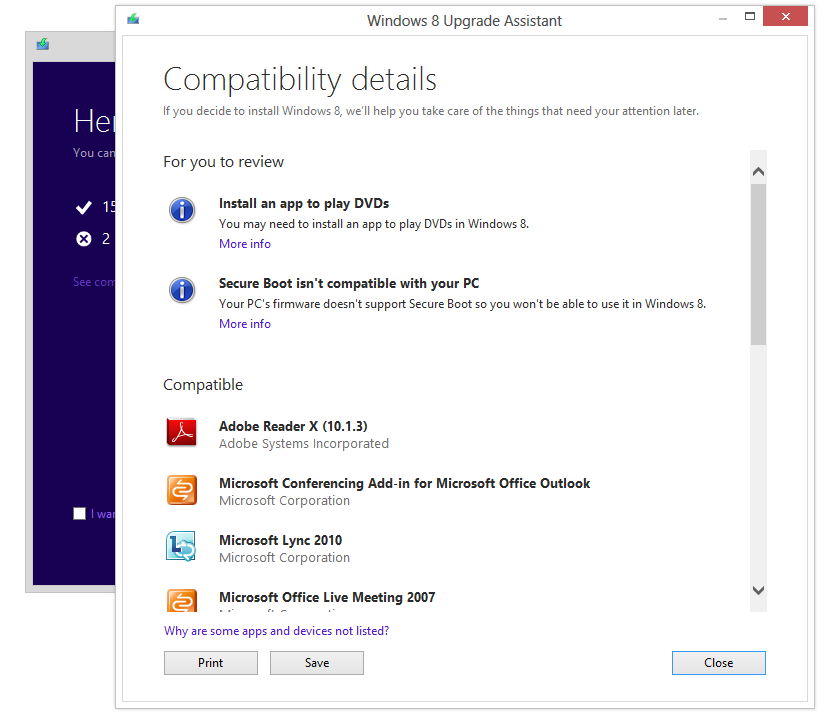
With Windows 8, Microsoft is handling upgrades itself. Users will be able to download the upgrade starting Oct. 26, the same day as general availability. Once the upgrade is available, Microsoft will send out e-mails, directing users to an Upgrade Assistant at Windows.com. This online utility checks for compatibility and then guides you through the download and installation process. (The download comes in at about 2 GB.)
At the purchase screen, you'll see a price of $39.99. You'll be able to enter your promo code for the $15 upgrade on the order confirmation page that follows.

Will Upgrades via DVD Be Available?

Microsoft says an optional installation DVD will be available “for an additional fee, plus shipping and any applicable taxes or duties.” You can also download the upgrade and create your own DVD or USB installation media at no extra charge.

What Version of Windows 8 Does the Upgrade Provide?

All PCs will be upgraded to Windows 8 Pro, regardless of which Windows version they were running before. (The one exception is Windows 7 Starter, which isn't eligible for the upgrade.) For more on what's included in Windows 8 Pro, check out our comparison chart.

When's the Deadline to Upgrade?

To qualify for the $15 upgrade, you must purchase a new PC by Jan. 31, 2013. The deadline to upgrade at the discounted price is Feb. 28, 2013. Microsoft hasn't yet said how much it'll cost to upgrade after the promotion ends.

Is There a Limit on Upgrades?

The $15 upgrade offer is limited to one per eligible PC, and five per customer.

Aside from $15 in Savings, is There Any Reason Not to Buy a New PC Right Now?

Windows 8 $15 Upgrade Offer: A FAQ for Recent PC Buyers
If you hate Windows 8 and all it stands for, then of course you'd want to buy a new PC before the new version hits. But if you're interested in the new interface and the Windows Store, I recommend waiting for hardware that truly takes advantage of the new operating system. That includes not only tablets, but laptops whose trackpads support Windows 8 gesture controls.

Monday, July 23, 2012

Microsoft Ready to Cash: Windows 8 & MS Office 2013!!

Microsoft revealed the date this week when it plans to start collecting on its bets. As of October 26--the official release date for Windows 8--all the cards will be on the table, and we will see if the gamble will pay off or not.
What gamble? Microsoft has a lot riding on Windows 8.
Internet Explorer 10
A successful Windows 8 could lead to a resurgence of Internet Explorer.Internet Explorer 9 only works with Windows Vista and Windows 7. Its successor--Internet Explorer 10--will only work with Windows 7 and Windows 8. The next generation of the Microsoft Office productivity suite is also limited to Windows 7 and Windows 8. PCs that aren’t running Windows 7 or Windows 8 are being left in the dust by Microsoft.
Microsoft has been uncharacteristically brazen about drawing these lines in the sand in recent years. The fate of Internet Explorer and Microsoft Office (and Windows itself) is tied directly to the success or failure of Windows 8. Now, it is putting its proverbial money where its mouth is, and doubling down with the discounted Windows 8. Making Windows 8 available for a mere $40 is a compelling offer.
If you use Windows--and you’re still using Windows XP or Vista—Microsoft is ready to call your bluff. You’re welcome to reject the bargain upgrade to Windows 8 and keep your legacy operating system. After all, it’s working just fine so you don’t need to upgrade, right? But, you’ll be on the wrong side of Microsoft’s line in the sand, and you will probably find both support and sympathy lacking when issues arise.
Many users could care less about Internet Explorer 9 or 10. Chrome, Firefox, and a plethora of other options work just fine. There are also businesses and consumers still happily using Office 2010 or even Office 2003, and they’re not interested in switching to Office 2013 any time soon. But, the $40 price tag on Windows 8 may still be enough to convince people to make the switch--just to hedge their bets and leave their options open.
Office 2013
If you want to use Office 2013, you'd better make the switch to Windows 8.While many users love Windows XP and maintain that they haven’t moved to Windows Vista or Windows 7 because they simply don’t see the need, I can’t help but believe money is still a major contributing factor in that decision. I translate it to “I like Windows XP, so it’s not worth $200 for me to buy Windows 7.” If Microsoft gave away Windows 7 for free, I think many of those holdouts would happily embrace the newer operating system.
Well, Microsoft isn’t giving Windows 8 away for free, but it is making a Godfather-esque “offer you can’t refuse”. With Windows XP rapidly approaching its end of life in terms of Microsoft support, that $40 move to Windows 8 will be very appealing. But, the bargain offer has a time limit, so users only have until January 31, 2013 to decide.
Microsoft has a lot on the line. Beginning October 26 we’ll see if Microsoft’s gamble will pay off.

For More Details, Click Hare 

Tuesday, July 17, 2012

Microsoft Office 2013 Preview: Hands On!!!!

Office 2013 is touchscreen ready, cloud friendly, and adds bold new twists to the Microsoft Office franchise. On Monday Microsoft CEO Steve Ballmer outlined what he said was the "biggest most ambitious Office" update to date.

For More Details, Click Hare 

                                    Download Sexy Girls Wallpapers, Click Hare

For the desktop Office 2013 delivers a host of smart updates to Word, Outlook, and Excel. But where Office 2013 shines is embracing the mobile world and the cloud with deep integration with Microsoft’s cloud service SkyDrive and collaboration - integrating its recent acquisitions Skype and Yammer. Windows 8, and the upcoming release of Microsoft Surface tablets and Windows Phone 8 smartphones, also play a huge roles in coloring Office 2013 with new features.
Ahead of Microsoft's big news Monday Microsoft provided PCWorld with two Windows 8 tablets (no, not the Surface) and access to the customer preview versions of both Office 2013 and the cloud-based Office 365.
Here is a look at how the software suite runs on laptop, desktop touchscreen, and tablet platforms.
In this story, PCWorld Senior Editor Michael Brown first gives his impressions of working with Office 2013 and 365 on a laptop and a desktop PC. Contributing editor Tony Bradley then writes about his tests of the new products on a tablet PC.

Office 2013, Office 365 on a Laptop and a Desktop PC

I spent most of my time with Word and Excel on a laptop and on a desktop all-in-one equipped with a touchscreen. As expected, Microsoft is tying Office 2013 and Office 365 tightly to its SkyDrive cloud-storage service.
You're free to use other services, but I suspect that this integration will lure plenty of Office users away from their paid accounts on Google, Dropbox, and SugarSync. If you buy a version of Microsoft's new software and sign up for a Microsoft Live account, you'll get 20GB of free storage in SkyDrive.
Ofiice 365 Preview: settings screen 
The Ofiice 365 Preview settings screen.
Both Office 2013 and Office 365 offer largely the same user experience, but Microsoft is clearly steering its customers toward the cloud-based version. The company is also marketing Office 365 to consumers for the first time, rather than strictly to businesses.
Purchase the traditional boxed copy of the software, and you get a license to install the software on one device. You can also use Office 365 on any computer or tablet, but that won't be very useful if you find yourself somewhere without your usual computer and without Internet access.
Buy a subscription to Office 365, and you get licenses to download and install Office 2013 on up to five devices (right now, the list of compatible devices is limited to PCs and tablets running Windows 7 or Windows 8, though Microsoft says Office 2013 for Mac will be available by the time the final software is released).
And, as with the boxed copy, you can stream Office 2013 to any PC or tablet running Windows 7 or Windows 8. Microsoft has not yet announced pricing for either product.

The New User Interface

The Office 2013 user interface isn't markedly different from the one in Office 2010: The ribbon remains front and center, though the text and the icons inside it are a bit larger and are spaced farther apart. These changes take better advantage of large monitors and touchscreen displays. Nevertheless, the ribbon isn't too big for an average laptop display, even with the addition of two new tabs: Design and Developer (actually, the Developer tab is present in Office 2010, but it's hidden by default).
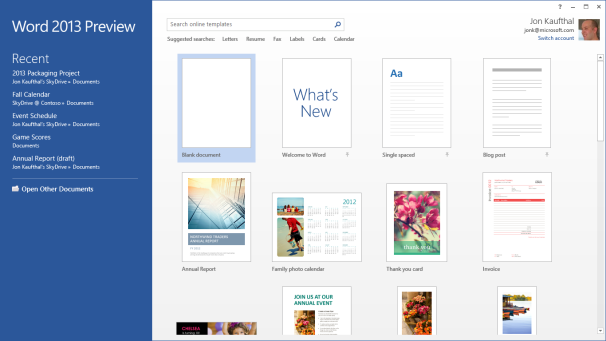
Word 2013If you're familiar with the ribbon user interface from Office 2007 and Office 2010, you’ll feel right at home with Word 2013.
Though I've used a number of all-in-one computers with touchscreens over the past few years, I don't use the touch interface very often. Perhaps I'm just a creature of habit, but it doesn't feel natural to take my fingers off the mouse to stab them at icons on the screen (or maybe my fingers are just too fat to be accurate). In any event, though I tried hard to use the ribbon with my finger, I kept returning to the mouse. The UI delivers more benefits on tablet platforms, but it doesn't feel any less natural when used with a mouse.

New and Cool Word Features

The Embed PDF feature in Word; click for full-size image. Microsoft has made a number of cool, interesting, and very useful improvements to Word 2013.

The Embed PDF feature in Word.On the usefulness front, you can now import a PDF directly into Word, edit it as a Word doc, and then save it as either a Word doc or a PDF. Not only do imported files retain all of the original documents' formatting--including headers, columns, and footnotes--but elements such as tables and graphics can be edited in Word as such.
Import a PDF file containing a table, for example, and you can edit the table just as though you had created it in Word from scratch. You can also embed a PDF file in a Word doc.
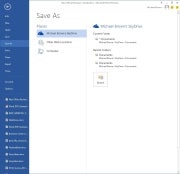
Saving files to the cloud; click for full-size image. Microsoft expects that people will want to save all of their files to the cloud. Your SkyDrive account is listed first, then Another cool feature is the ability to connect to online resources and bring them inside your documents. For example, you can use Bing to search the Web for videos, without leaving Word, and then embed the HTML code for that video in your document.
Link your SkyDrive account to your Flickr account, and you can jump to your online photo collection and embed photos directly in the document--again, without ever leaving Word.
Embedding a screenshot from an app running on your PC is even easier: Click Insert > Screenshot, and a window with thumbnails of every window open on your desktop will become visible. Click the image you want, and it will appear wherever your cursor is.
When you embed an image or a video in a document, you can grab that element and move it around the document and watch as your text automatically reflows around it in real time.

Word Collaboration Features

When you're collaborating with other people on a document, being able to track the changes that each person makes is critical. This becomes much easier to do in Word 2013, thanks to a new feature called simple markup view.
A red vertical line in the left margin indicates that changes have been made to the document, while a word balloon in the right margin indicates the presence of a comment. Click on the vertical line to reveal both the edit changes and the comments; click on the word balloon to show just the comments.
Microsoft has also added a new viewing mode, called Reader. When you view a document in this mode, each paragraph has a small triangle in front of it. Click the triangle after you've finished reading its associated paragraph, and the paragraph will collapse so that more text will appear, without your having to scroll to another page.
I haven't had time to explore every new feature of Word 2013, but I like what I've seen so far. It looks as though Microsoft has significantly improved the application, adding some great new features without mucking anything else up in the process. Nevertheless, my opinion at this stage is based on very limited time with the product.

Excel 2013

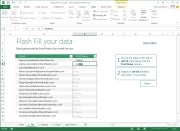
Like the new version of Word, Excel 2013 feels fresh yet comfortingly familiar. Microsoft has added several new whiz-bang data-analysis tools, including one called Flash Fill. When you take an element of data that you've already entered in one column and enter it in a second column, Flash Fill will predict that you intend to do that for every value in the second column, and will offer to fill in the second column for you accordingly.
Excel's Flash Fill; click for full-size image.
Excel's Flash Fill feature will notice patterns in your data entry, predict what you intend to do next, and then offer to fill in the rest of the data for you.
Microsoft provided a sample two-column spreadsheet to demonstrate how this feature works. The first column contained email addresses in which each person's address was formatted as first-name.last-name@domain-name. The second column was to be used to store each person's first name.
Though that isn't the most realistic scenario imaginable, it works. You establish the reference example by typing the first name of the first person in the email address column; then, as you begin typing the second person's first name, Excel predicts that you want to do the same for every other value in the first column and offers to do just that automatically. Press the Enter key, and the second column automatically fills with first names.
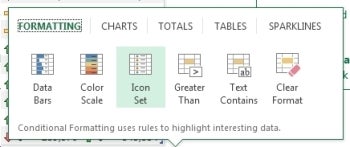
Colors and symbols can help you analyze data more quickly, and Excel 2013's new Quick Analysis tool uses these elements to identify and highlight trends and changes. Select the rows and columns that you wish to have analyzed, click the icon that appears in the bottom right corner, and choose the conditional formatting that suits your needs. Instead of looking at rows and columns of gray numbers, you'll instantly see a spreadsheet formatted with color scales, bars, and icons.
Excel’s Quick Analysis tool.
Excel’s Quick Analysis tool automatically suggests conditional formatting that will help you visualize data locked in your spreadsheets.Charts and graphs provide another easy way to visualize data, and spreadsheet software has long permitted users to generate charts and graphs based on the data they enter into its rows and columns.
Excel 2013's new Quick Analysis tool will automatically suggest the most appropriate types of graphs--bar, pie, scatter, and so on--based on the data set that you select.
My early impressions of Excel 2013 are about as favorable as my corresponding impressions of Word 2013. Microsoft seems to have introduced some solid new features without imposing a difficult learning curve. Take that, ribbon haters.
We'll take a closer look at Outlook, Powerpoint, OneNote, and the rest of the suite soon.
--PCWorld Senior Editor Michael Brown

Office 2013 and Office 365 on a Tablet: First impressions

Microsoft is betting heavily on the idea that tablets are the future of PCs. Like Windows 8, Office 15 was built from the ground up to take advantage of a tablet's unique features, while at the same time addressing the limitations of the touchscreen interface for creating content.
I ran Office 13 through its paces on a Samsung Series 7 Slate PC running Windows 8 Consumer Preview to see how well it performs on a tablet. Bear in mind that this tablet runs Windows 8 Pro, not Windows 8 RT, and that Office 2013 and Office 365 differ from the Office for RT apps that will be available on ARM-based Windows 8 tablets.
Microsoft has done a great job of making the tools and functions of the various Office applications accessible from a touchscreen interface without lessening the capabilities. For example, holding your finger on a misspelled word will pull up Office's list of possible corrections; and holding your finger on virtually anything brings up the options you'd normally find by right-clicking a mouse.
Word's functions on a tablet screen.Microsoft did a nice job of fitting all of Word's functions into the screen space of a tablet.I did sometimes find that the options on the ribbon interface were hard to tap. The buttons are a bit small for my fingers, and you can't pinch-to-zoom to enlarge the ribbon in Office 2013. On the other hand, you can make the ribbon bar disappear to maximize the area available for your document--in both Office 2013 and Office 365--which is nice.
The Office 2013 suite I installed on the tablet included Word, Excel, PowerPoint, OneNote, Outlook, Publisher, Access, Lync, and a couple of bit players. The only apps available within Office 365, however, are Word, Excel, PowerPoint, and OneNote. Outlook exists in Office 365 as well, but the option was grayed out on the software I worked with.
One thing that I like about working with Office on the tablet is more a function of Windows 8 and/or the hardware its running on than of Office itself. The touchscreen virtual keyboard is sensitive and fluid enough to allow me to type at very nearly full speed. Also, tapping the symbols and numbers button brings up an actual number pad, which is much more efficient for entering figures in an Excel spreadsheet.
That said, it was a little annoying to have to tap the keyboard icon at the bottom of the display to open the virtual keyboard. It would have been nice if Office applications had recognized when I tapped on a text field, and responded by automatically opening the virtual keyboard. Perhaps, though, Microsoft wanted to respect the limited screen real estate of the tablet and let users navigate documents without having the keyboard pop up all the time.
Overall, the experience is solid. Using it differs from using a mouse and keyboard with a traditional PC, but it's a functional arrangement. Microsoft has obviously invested a lot of thought and effort in ensuring that the tablet experience that Office offers is worthy of the Microsoft Office name.
For More Details, Click Hare 

Thursday, July 12, 2012

Unlocked Galaxy Gets Android Jelly Bean Update!!

Have a Samsung Galaxy Nexus that isn't running on Verizon or Sprint? Well good news! The update to Android Jelly Bean has started rolling out and should be hitting your phone in the next couple of days. The update brings with it Google Now, new notifications, and a much more responsive interface thanks to Project Butter.
In the Google+ post that announced this exciting bit of news, Google also mentioned that the Motorola Xoom, Nexus S, and other Galaxy Nexus phones (it presumably meant those running on Sprint and Verizon), were the next devices in line to receive the upgrade to Jelly Bean. The company also stated that the Nexus 7, which is shipping later this month, would be running the latest Android operating system--something which it had already announced at Google I/O last June.
Unfortunately, outside of the Nexus 7, Google didn't give a timeframe for when we could expect the update to become available to those other phones (and tablet). Hopefully it's sooner rather than later, but at least for now more people can enjoy the benefits of owning a Google developer device.

For More Details, Click Hare 

Friday, June 29, 2012

How to Produce Online PowerPoint Presentations !!

How To Produce Online PowerPoint Presentations
Once you’ve created a PowerPoint presentation, it’s time to think about how you will present it. PowerPoint has a few options for making online presentations, but they deal with just a few scenarios. Fortunately, several free third-party products are available to help you achieve the results you’re looking for.
PowerPoint 2010’s Broadcast feature will do the job if you’re presenting to an online audience (up to 50 people) watching in a Web browser during a real-time conference call. They won’t even need to have their own copy of PowerPoint. But if the people to whom you’re pitching want to view the presentation offline at their leisure, or if you have to set up the presentation so that any number of people can view the slideshow at any time, you’ll need something else. I’ll show you several methods of accomplishing each of these goals.

Broadcast a Presentation in Real Time

If you want to present online in real time, simply use PowerPoint 2010’s built-in Broadcast tool. (Note that you need a Microsoft Live ID to use this feature.) Once you’ve built the presentation, click File in the top menu bar and then choose Save & Send. Next, select Broadcast Slide Show (in the middle column of options) and then click the Broadcast Slide Show button (it’s the only button in the third column). When the Broadcast Slide Show dialog box appears, click Start Broadcast. If you’re not already signed in to your Microsoft Live account, you’ll see a prompt to sign in. At this point, you need to wait while your presentation uploads to the broadcast service.
How To Produce Online PowerPoint Presentations
PowerPoint 2010's Broadcast feature lets you make presentations on the Web in real time.
Once the upload is complete, you’ll see a dialog box containing a link that your viewers can use to open the slideshow on their own machines. Click Copy Link to put the link on your clipboard, or click Send in Email to distribute it that way (the latter link, however, defaults to opening Outlook, which might not be suitable if you use browser-based email).
You must wait until everyone is prepared for the meeting before you start the presentation. When the audience is ready, click the Start Slide Show button in the Broadcast Slide Show dialog box. The slideshow will display on your screen and on your audience members' screens simultaneously, and you can work through the slideshow one slide at a time knowing that everyone’s screens will be in sync. The broadcast stream will not carry audio, so don’t bother adding a soundtrack or sound effects to your presentation.
When the presentation is finished, click the End Broadcast button to stop the broadcast and disconnect all viewers from the slideshow (this won’t, of course, disconnect them from the independent conference call).

Deliver a Presentation as a Video

How To Produce Online PowerPoint Presentations
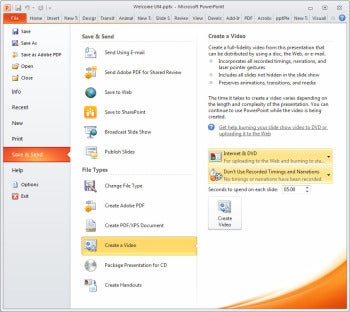
PowerPoint 2010 can encode presentations as .wmv video files.If you’d like to convert your slideshow into a video presentation, PowerPoint 2010 can encode it to a .wmv file. Click File > Save & Send, and then select Create a Video (in the middle column). In the right column, you’ll see two sets of drop-down menus with options for encoding the video. Click the Computer & HD Displays button to reveal two additional options: Internet & DVD (the best choice for videos that you will share online) and Portable Devices. Once you’ve made your display choice, click the Recorded Timings and Narrations button and choose the Record Timings and Narrations option to add a soundtrack, if your presentation doesn’t already have one.


Progress through your presentation, speaking about each slide as you display it. Click the Next button on the recording toolbar to move to the next slide. Repeat these steps until you’ve recorded the audio for your entire slideshow. When you reach the last slide, the program returns you to the PowerPoint Backstage area. Click the Create Video button and type a name for the video file, and then wait as PowerPoint encodes the video.
Once it has created your video, you can upload the video file to the Web. Use an online video-streaming service such as Vimeo, and you’ll be able to mark the file as either private or accessible to anyone.


Share a Presentation via SkyDrive

How To Produce Online PowerPoint Presentations
Upload a presentation to a SkyDrive account, and your audience will be able to view it from a shared folder.Anyone using Microsoft’s SkyDrive cloud-storage service can upload PowerPoint presentations to the cloud for sharing (with everyone, via the Public folder, or only with those people you have invited). Choose File > Save & Send > Save to Web. As with PowerPoint’s Broadcast feature, you need a Windows Live account to take advantage of this feature.
How To Produce Online PowerPoint PresentationsYou'll see a display of the folders on your SkyDrive. Click Public if you want to share the presentation with everyone. If you want to share it with a limited number of people, select a shared folder or add one by clicking New. Back in PowerPoint, click Refresh, select the desired folder, and then choose Save As to save the file there.
Your SkyDrive sharing options include Facebook, Twitter, email, and a direct link.Once the file has uploaded to your SkyDrive account, log in to your SkyDrive folder, click the presentation, and click Share. Now you can decide whether to send an email message containing a link to the presentation, to post the link to your Facebook or Twitter account, or to obtain a link that you can send to someone via other means.

Embed a Presentation in a Web Page Using Google Docs


How To Produce Online PowerPoint Presentations
Google Docs gives you an array of settings for publishing your presentation to the Web.At times you may want to publish a presentation that anyone can access, perhaps by embedding it in your website. One way to do this is to upload the presentation to your Google Docs account and publish it to the Web from there.
You need a Google Docs account, of course. Save your PowerPoint presentation as usual, and then sign in to your Google Docs account and click the Upload button (you’ll find it represented by an icon on the left side of the page, to the right of the Create button). Choose Files from the pop-out menu, locate your presentation, and upload it. Google Docs will automatically convert the file to its native format. Once the presentation is in Google Docs, open the file in Google Presentations, click the Share button (in the upper-right corner of the interface), and set the visibility options and access levels as you like.
Google Docs offers three visibility options: 'Public on the Web' means that anyone can see the presentation, 'Anyone with the Link' means that only those with whom you’ve shared the link can see the presentation, and 'Private' means that only you have access to the file. You get four Access levels, too, ranging from Commenters (who can view, comment on, download, and copy the presentation, but can’t delete it or change its sharing settings) to Owners (who have complete control over the presentation).

Deliver Presentations to iPad Users

How To Produce Online PowerPoint Presentations
SlideShark makes it easy to share PowerPoint presentations with iPad users.No iPad version of PowerPoint exists currently, but you do have a way to share your PowerPoint presentations with iPad users. Sign up for a free account with SlideShark, and upload your presentation. Your iPad-using audience will need to download and install the free SlideShark app before they open the presentation. SlideShark can also share your PowerPoint presentations via Facebook, LinkedIn, Twitter, or email.

For More Details, Click Hare 

Thursday, June 28, 2012

Google I/O: Chrome Browser Improvements; Chrome and Google Drive for iOS; New Chromebooks!!

Google I/O: Chrome Browser Improvements; Chrome and Google Drive for iOS; New ChromebooksGoogle Thursday announced improvements to its Chrome browser, improvements to Google Docs, and Chrome and Google Drive for iPhone and iPad, among other things on Day Two of the Google I/O developer conference in San Francisco.

  For More Details, Click Hare 

Google Drive Improvements

While today's announcements paled in comparison to those rolled out in yesterday's big show, a few of them will certainly be of interest to consumers.
Perhaps the most substantial announcements concerned Google's Drive cloud-based suite of productivity apps (formerly known as Google Docs).
One cool improvement to the product lets you work on word documents when you are not connected to the internet. The capability is available immediately for word documents, and later on for spreadsheets and presentations.
Google Chrome product manager Brian Rakowski.
Google has been working to allow us to sync our Drive documents between different kinds of devices, and to work on documents with our friends or workmates regardless of the type of devices being used.
To that end, the company announced that Drive will now be available for use on the iPhone and the iPad. You can now add people to collaborate with.
Developers can now design their apps to send faxes, and send and receive documents, using Drive.you from within Drive; while collaborating you can see your document updating in real time on whatever tablet or phone you may be using.
Google says that more than 10 million people began using Google Drive "in just over 10 weeks" after its release.

Chrome Browser Improvements

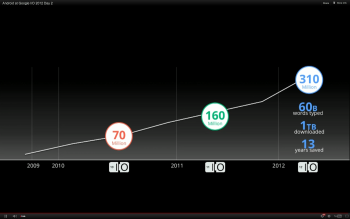
Google says more than 310 million people worldwide now use the Chrome browser.
Google says 310 million people now use its Chrome browser.
Google Chrome browser product manager Brian Rakowski was on stage to announce some new capabilities for developers.
He demonstrated how developers will now be able to easily build voice recognition into their Chrome apps. That will allow users to give commands to their apps without touching touchscreens or typing.
The biggest announcment around Chrome, however, is the news that a version of the Chrome browser for the iPhone and the iPad will become available later today.

Chromebooks Get Faster


The Chromebooks that Google introduced last year were not well received, mainly because of their connection and storage limitations, and because of sluggish performance. But the Google laptops have survived, and Google says the the new Chromebooks are three times faster than the original chromebooks.
They will also become easier to purchase. Chromebooks will soon go on sale in selected Best Buys and other retail outlets across the United States. Google also says it's working with a series of computer makers to release more Chromebooks by the Christmas season.
Cirque du Soleil demonstrated its new HTML5 app, which responds to your body movements detected by your web cam.

The Cloud Gets Bigger

Google says that its cloud infrastructure is now so powerful and scalable that developers can run their apps entirely in the cloud to as many users as they want "for a reasonable price."
This was demonstrated by showing the Google I/O kenote audience an entirely cloud-based gamed called Bulletstorm on a giant screen. The game ran very smoothly in the demo, and the graphics looked great; it looked a lot like a game running on a gaming console.

Very Developer-Oriented Keynote

Unlike yesterday's announcements, the new features and services rolled out today (other than the Drive and Chrome apps announcements), seemed aimed at the developer crowd.
However, the developers in the crowd were treated to a reprise of the skydiving act from yesterday, in which the divers all wore the Google Glass glasses and filmed their descent from the air. Today's show was more of a how-to, hosted by Google founder Sergey Brin, and was noticeably less exciting for consumers than yesterday's spectacle.

Tuesday, June 26, 2012

Firefox for Android Gets a 'Screaming Fast' Upgrade!!

Mozilla on Tuesday rolled out a brand-new version of its popular Firefox browser for Android that's designed to deliver faster performance, a fresh new look, and Flash support, among many new features.
firefox for android
“The new Firefox for Android is a snappy and dynamic upgrade to mobile browsing that makes it faster and easier to get where you want to go on the Web,” reads the official announcement on the Mozilla Blog.
Designed for smartphones running Android 2.2 or later, the new Firefox 14 for Android is now available in the Google Play Market as a free download.
'Dramatic Performance Improvements'

First and foremost among Firefox for Android's new features are significantly faster speeds, Mozilla says.
“We redesigned Firefox for Android to make it a screaming fast and personalized upgrade to mobile browsing that lets you take your Web experience everywhere you go,” Mozilla explains. “You’ll notice dramatic performance improvements that make Firefox on your Android phone super fast with everything from startup and page load times to panning and zooming and Web app performance.”
In fact, Firefox for Android is apparently twice as fast as the stock Android browser on Mozilla's Eideticker benchmark, which measures the user's Web experience. It's also significantly faster on standard industry benchmarks, such as Sunspider.
The video below depicts the software's newly boosted startup time.
<p>Your browser does not support

'The Highest Level of Privacy and Security'
Also included in the new Firefox for Android is a fresh new look and a personalized start page. A new Awesome Screen powered by Firefox Sync delivers all your browsing history, bookmarks, passwords and form data to your Android phone.
Features including tabbed browsing, Firefox Sync, and Firefox Add-ons have now been optimized for mobile browsing, and Flash support means “you can watch videos, play games, and interact with more Web content on your Android phone,” Mozilla notes.
With features including Do Not Track, Master Password, and HTTP Strict Transport Security, meanwhile, Firefox for Android offers “the highest level of privacy and security features in mobile browsing,” the project explains.

New HTML5 Capabilities
Last but not least, new HTML5 capabilities in Firefox for Android allow developers to create rich Web apps and websites based on HTML5, JavaScript, CSS, and other open Web standards.
The video below offers an overview of some of the open source software's key new features. More detail can be found in the official release notes for Firefox for Android.
<p>Your browser does not support iframes.</p>
Do you plan to try out Mozilla's new software? If so, please leave your impressions in the comments.

Wednesday, June 20, 2012

Windows Phone 8 Will Be Deeply Integrated With Windows 8 OS!!

Windows Phone 8 Will Be Deeply Integrated with Windows 8 OSMicrosoft announced today that its forthcoming mobile operating system, Windows Phone 8, will become closely linked with desktop PCs and tablets running Windows 8.
With many wondering about the fate of Windows phones in an iPhone world, Microsoft is effectively linking the fate of its mobile operating system to the success of its PC operating system, which is currently used by 1.3 billion people worldwide. It is Redmond's second big announcement this week: The Microsoft Surface tablet event happened Monday.
"The future of Windows 8 is a 'shared core' between Windows Phone 8 and Windows 8," said Windows Phone 8 product manager Joe Belfiore. This means that the two operating systems will share the same kernel, plus the same files system, multimedia apps, and graphics support.

Microsoft Windows Phone 8
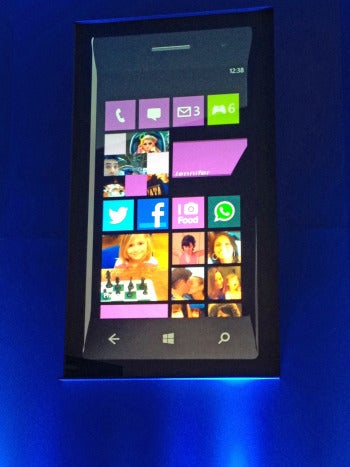
The Microsoft Windows Phone 8 "tiles" interface.For users, this integration means that apps that work on Windows phones will also work on desktop PCs and tablets, and they will find it easier to share content and apps seamlessly between their Windows Phone and their Windows tablet or desktop PC.
The shared core also will make life easier for developers because they will be able to develop content and apps that run on both phones and PCs; they can spend far more time developing, and far less time "versioning."
Windows phone users will benefit from a reenergized development community that will develop cooler apps--apps that could be far more competitive in number and quality than Apple ecosystem apps.
Here are some of the major improvements in Windows Phone 8:
  • Tiles Interface: Microsoft rolled out a newly designed version of the “tiles” user interface for Windows Phone 8, which it calls the "marquee feature" of the new mobile OS. The tiles are “live” and can show various types of content at different times. (See image above.) You can also make a tile for a Nokia map on the home screen (see 'Mapping' item, below).
  • Web-Page Rendering: Microsoft also announced that Windows Phone 8 will support the same Web-page rendering engine as Windows 8, so developers can create Web pages for desktops and tablets, and know that the pages will work the same way on phones.
  • Mapping: Windows Phone will have Nokia mapping technology built in. This comes just on the heels of news that Apple has developed its own mapping app for the iPhone, but Nokia’s maps have more development time behind them, and are expected to be a major addition to WP8.
  • Display Support: Windows Phone is (finally) adding support for standard 720p, WXGA 1280 by 768, and WVGA 800 by 480 displays.
  • Storage: WP8 will add microSD card support to its phones. Windows Phone users will be able to employ the small memory cards to store memory and move data back and forth between their phones and their PCs.

Mobile Wallet

WP8 mobile wallet
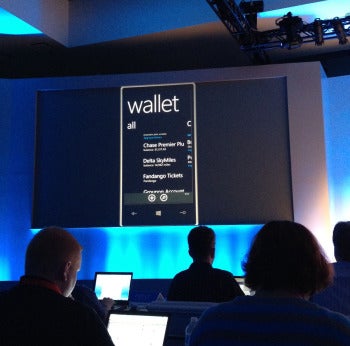
Windows Phone 8 mobile-wallet feature shown at demo.Microsoft will use Windows Phone 8 to catch up with Android and the iPhone on mobile-wallet capabilities. Windows Phone 8 will include a “mobile-wallet hub” that will allow users to pay for goods and services with their phones.
Users will be able to store financial information of many different kinds in the wallet, such as bank and credit card data, frequent-flyer memberships, coupons, and even their library card. The wallet will integrate with new apps like the forthcoming Chase Bank app, which was demonstrated at the event today.

Game Development

Microsoft announced that developers will now be able to develop games for both phones and PCs using native C++ code and a set of common APIs (application programming interfaces).
This will allow developers to put up better-looking apps for both platforms, and to spend much less time developing seperate versions for PC and mobile.

The Business Angle

Microsoft is also adding features in Windows Phone 8 to make the OS more business-friendly. These include support for Bitlocker encryption, secure boot, flexible app distribution, and device management. This is a big deal for IT managers, and it will help Microsoft pursue its strategy of winning the consumer phone market by making a phone that works for business life as well as personal use.
Windows Phone 8 Company Hub
Windows Phone 8 Company Hub.Windows Phone 8 will offer IT managers a "Company Hub" feature that will allow them to create a customized experience on the phone for employees.
The hub (see image at left) will show the apps that the employee has already installed, and then suggests some that might be useful, like the "time-off" app. An alerts page will notify employees to change their passwords. Microsoft will also provide templates to help businesses quickly put together miniportals for employees' Windows 8 phones.

No Joy for WP7 Owners

Unfortunately, owners of Windows Phone 7 phones will not be able to upgrade to the new OS this fall. The OS update adds support for core elements like dual-core processors, voice recognition systems, the graphics system, and the modem--developments that existing hardware cannot support.
However, Microsoft says that existing WP7 phones will be able to upgrade to WP 7.8, which will at least give them the new interface, or "live-tiles" experience.
Windows Phone 8 is expected to go into general release with the Windows 8 operating system this fall. The first Windows Phone 8 phones will come from Nokia, Huawei, Samsung, and HTC, and will be built with chips from Qualcomm. Microsoft rolled out the new features in a Windows Phone platform preview for developers (who need to know the new features early) at the Windows Phone Developer Summit held in San Francisco today.

Tuesday, June 12, 2012

Apple iOS 6 vs. Android vs. Windows Phone Comparison!!

Apple's World Wide Developer Conference (WWDC) kicked off today with the unveiling of iOS 6 for the iPhone and iPad. Apple is promising over 200 new features in the latest version of its mobile operating system, but only a few of them were highlighted in the keynote.

                                      
Download Sexy Girls Wallpapers, Click Hare

June is an exciting month for smartphone fanatics as Microsoft is expected to unveil the next generation of Windows Phone at an event next Wednesday, June 20 while Google is expected to reveal its plans for the next version of Android, codenamed "Jellybean."
While some of the features Apple announced today already exist on competing platforms, Apple is putting its own twist on these updates. For example, Siri, Apple's voice-activated virtual assistant, is even smarter now with support for sports, movies, and restaurants. Siri can also directly launch apps, but you still can't control these third-party apps with your voice.
Apple is also breaking up with Google Maps and launching its own Maps application with iOS 6. It includes local business information, Yelp integration, real-time traffic updates, and turn-by-turn navigation. Naturally, Apple has also added Siri integration to maps so you can ask questions along your journey such as, "Are we there yet?" or "Where's the next gas station?" Apple has also added a 3D/fly-over mode to its Maps application, which shows you detailed 3D models of buildings and landmarks.
 
 
These updates certainly give Microsoft and Android something to chew on. While both competing platforms offer voice-command support, those features are crude in comparison to Siri's artificial intelligence and natural dictation. Microsoft's Bing Maps could definitely use a revamp in the next version of Windows Phone as its turn-by-turn directions feature is quite clunky (you must tap your phone at each turn).
We'll be revisiting this comparison later this month as Microsoft and Google roll out new versions of their respective mobile platforms.

Sunday, June 10, 2012

Adobe Patches Critical Flash Bugs, Ships Sandboxed Plug-in for Firefox !!

Adobe today patched seven critical vulnerabilities in Flash Player -- the fifth security update so far in 2012 -- and released a sandboxed plug-in for Mozilla's Firefox.
The new Flash Player silent updater for OS X is set to automatically install future updates in the background.The company also released the "silent update" tool for OS X, and said it had prepped Flash for the upcoming OS X 10.8, aka Mountain Lion, by signing its code, a requirement if users are to install software downloaded from sources other than Apple's own Mac App Store.
"These updates address vulnerabilities that could cause a crash and potentially allow an attacker to take control of the affected system," said Adobe in an advisory published Friday.
The flaws were all over the map, and included memory corruption, integer and stack overflow, and security bypass bugs. One of the seven was tagged as a "binary planting" vulnerability in the Flash installer.
"Binary planting" is a synonym for what others call "DLL load hijacking," a bug class first uncovered nearly two years ago by HD Moore, chief security officer at Rapid7 and creator of the open-source Metasploit penetration-testing toolkit.
Because many Windows applications don't call DLLs using a full path name, instead using only the filename, hackers can trick an application into loading a malicious file with the same title as a required DLL.
Unlike the last Flash security update, which Adobe issued May 4, today's bug patches are for vulnerabilities that the company has not seen exploited in the wild.
Among those Adobe credited for reporting the vulnerabilities was a researcher from the Google Chrome team, another from Symantec and two engineers who work for Microsoft.
Microsoft and Adobe have been working even closer than usual of late: Last week, Microsoft announced that it had, with Adobe's help, integrated Flash Player into the Metro version of Internet Explorer 10 (IE10).
That move seemed to contradict Microsoft's earlier promise that it would not allow plug-ins -- Flash Player is probably the most widely-used browser plug-in on the planet -- in IE10 on Metro, the new tablet-oriented user interface (UI) within Windows 8 and the sole mode on Windows RT.
Also included in Flash Player 11.3 was a sandboxed plug-in for Firefox and the promised silent update tool for OS X users.
Adobe first talked about sandboxing Flash for Firefox in February, when it released a beta version of the plug-in for that browser on Windows Vista and Windows 7.
The new Flash Player silent updater for OS X is set to automatically install future updates in the background.
A sandbox isolates processes on the computer, preventing, or at least hindering, hackers trying to exploit an unpatched vulnerability, escalate privileges and push malware onto the machine.
Adobe first sandboxed Flash Player for Google's Chrome in late 2010 after working with Google engineers; the sandboxed plug-in for Firefox came after similar cooperation from Mozilla engineers, Adobe said several months ago.
The Mac background updater debuted just over a month ago in a beta version of Flash Player 11.3, but went final today. The tool is identical to the Windows version, which Adobe launched in March: It pings Adobe's servers every hour until it gets a response. If it reaches Adobe and finds no ready update, the tool re-checks the servers 24 hours later. Found updates, however, are applied entirely in the background, and do not display notices on the screen or require the user to take any action.
By default, Flash 11.3 has silent updates switched on for OS X users, but they can change the setting to continue to receive on-screen alerts, or more dangerously, decline all updates.
Adobe has also prepared Flash Player for the release of Apple's next desktop operating system, Mountain Lion.
Mountain Lion includes a new feature called Gatekeeper that by default will let users install only software downloaded from the Mac App Store -- the Apple-curated market that debuted in January 2011 -- or signed with certificates Apple provides free-of-charge to registered developers.
Gatekeeper is Apple's reaction to last year's spread of the Mac Defender malware, which was tucked into fake security software: Gatekeeper will prevent such "scareware" from ending up on Macs.
"Starting with Flash Player 11.3, Adobe has started signing releases for Mac OS X using an Apple Developer ID certificate," said Brad Arkin, Adobe's senior director of security, products and services, on a company blog today. "Therefore, if the Gatekeeper setting is set to 'Mac App Store and identified developers,' end-users will be able to install Flash Player without being blocked."
Because Flash is not distributed through Apple's desktop app market, if users set Gatekeeper to the most restrictive option -- "Mac App Store" -- they won't be able to install or update Flash Player.
Flash Player was upgraded Friday to version 11.3 for Windows and OS X, to 11.2 for Linux and to 11.1 for Android. As of 3 p.m. ET, Google had yet to update Chrome, which includes its own version of Flash, to gives its users the patched edition.
Gregg Keizer covers Microsoft, security issues, Apple, Web browsers and general technology breaking news for Computerworld. Follow Gregg on Twitter at @gkeizer, on Google+ or subscribe to Gregg's RSS feed. His email address is gkeizer@computerworld.com.
See more by Gregg Keizer on Computerworld.com.
Read more about malware and vulnerabilities in Computerworld's Malware and Vulnerabilities Topic Center.

Friday, June 1, 2012

E3 Preview: What We Up at E3 2012

E3 2012 PreviewThe 17th annual Electronic Entertainment Expo kicks off next week in Los Angeles, and PCWorld editors will be scouring the show floor all week in search of the most interesting gaming hardware and software. We learned a lot from our time at E3 2011, but it’s still tough to predict what the big news will be at E3 this year. Some of PCWorld’s most passionate gamers took time to share their opinions on what to expect from E3 2012; read on for their thoughts, share your own in the comments, and bookmark PCWorld’s Game On blog to stay on top of our E3 2012 coverage.
E3 2012 Preview
Alex Wawro covers games, how-tos, and security for ITNewsTouch.
What to Expect: It will be a quiet E3 this year, if you’re hoping for surprise announcements about the next generation of gaming consoles. I predict that we won’t see any new hardware from Microsoft or Sony; at best, we’ll get sizzle reels during their respective press conferences that tease us with the features and specs of a new Xbox or PlayStation in 2013. Given the success of Microsoft’s subscription-subsidized $99 Xbox 360, it’s not crazy to think that Sony may release a budget version of the PS3 this holiday season that costs less than $100 and requires a multiyear subscription to the PlayStation Plus program. I bet we’ll get confirmation of Nintendo’s plans to release the Wii U console this year, plus a firm commitment on the games that will be available at launch; after spending some time playing the Wii U at E3 last year, however, I’m not terribly excited about the device.
Also, there’s absolutely zero chance that Apple will ever release a home gaming console. Stop asking.


E3 2012 PreviewWhat I Want to See: I'm hoping for something wonderful and unexpected. We know that E3 2012 will be dominated by established game franchises; whether you’re interested in Assassin’s Creed, Halo, or Madden, you’re guaranteed to hear plenty of details coming out of Los Angeles next week about the latest installment in your favorite franchise. What I want, though, is something out of left field, a surprise announcement akin to the revelation that Nintendo’s next console will include an idiosyncratic tablet controller. It could even be something as simple as a fantastic new game that lets me explore a fresh world in a completely unexpected way; the motion-control capabilities of current-gen technology such as the PlayStation Move controller or the PlayStation Vita would be perfect for such a game, and I really hope we see something this year that nobody could predict.
In fact, I’d really like to see something wonderful from Sony this year. I thought Sony put on a fantastic show at E3 last year, but the PlayStation Vita has had a rough launch worldwide. I love the device, and I hope Sony shows us something next week that makes PlayStation Vita owners happy.

What I Don’t Want to See: I'm tired of games that require you to kill people. It’s boring, and almost everyone is doing it. In modern games, it’s pretty much impossible to play through without being asked to obliterate someone or some thing by shooting/stabbing/smashing it on the head, so a game like Fez is a breath of fresh air. Although I certainly won’t get through E3 2012 without having to shoot someone in a video game (Halo 4, Black Ops 2, and Borderlands 2 will make sure of that), it would be nice to see some big-budget titles that challenge players to accomplish something more cerebral than blasting through wave after wave of seemingly suicidal enemies. Let's hope that I’ll get some hands-on time with SimCity and The Last Guardian to soothe my shattered psyche.
E3 2012 Preview
David Daw is a freelance writer who covers games and technology for PCWorld. You can find his work on our Game On blog.

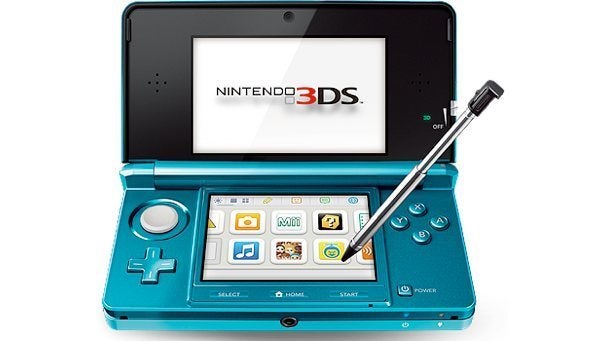
What to Expect: For console gaming, this E3 almost seems like a repeat of last year's show. Nintendo will be busy hyping the Wii U. Microsoft and Sony have a small chance of announcing their next consoles, but more likely they'll just make the case for why their aging machines still have plenty of life left. When it comes to gaming hardware, all the excitement is bound to be focused on the portable gear. Both the Nintendo 3DS and the PlayStation Vita have had exciting but somewhat rocky years, and Nintendo and Sony will probably announce new software and possibly even new hardware to try to stabilize their mobile lineups.
PC gaming will be a little more lively this year, with the rise of indie gaming and the free-to-play model breathing new life and creativity into the scene. Expect a lot more oddball PC titles in addition to the big marquee games this year.
E3 2012 PreviewWhat I Want to See: It's high time that we started putting this generation's gaming peripherals to good use. We have the Kinect, the Wii, and the PlayStation Move all promising new ways to game, yet almost no titles deliver on that promise. While we all wait for the changing of the guard, I want to play Kinect games that are as good as the tech demos made by people playing around in their garage. I want a reason to use a PlayStation Move with an actual PlayStation, instead of hooking it up to my Mac to play Johann Sebastian Joust. I want us to do motion gaming right before we move on to the next thing.

What I Don't Want to See: I'm not looking forward to another year of interchangeable game clones that slap a new setting on whatever the genre of the moment is. It already seems like this is the year of the cheap Assassin's Creed knockoff: Everybody and their brother appears to be hyping a stealth action game in a future/alternate past/fantasy setting--and I hope we don't see a ton more on the show floor, since the Assassin's Creed franchise is already churning out enough cheap knockoffs of itself.
E3 2012 Preview
Armando Rodriguez covers mobile software and Android developments; he also loves every genre of games, save flight simulators. 

What to Expect: We'll get lots of software, and very little hardware. Outside of the Wii U, I don't think any of the big guys are releasing new hardware this year. You can expect to hear more about Grand Theft Auto V, Call Of Duty: Black Ops 2, and Halo 4 (don't you just love sequels?), but I wouldn't hold my breath waiting for Microsoft or Sony to announce the Xbox 720 or PlayStation 4 at the show.
As for what kinds of software will be on display at E3, my sources tell me that apps will be bigger this year than they were before, and that pretty much every major studio will have an app or two they'll want to show off. Considering the types of games I've seen EA and Ubisoft release on iOS and Android, I can say that they probably won't require you to fling birds at pigs or farm crops with your friends.

What I Want to See: Asking a gamer what they want out of E3 is like asking someone what they'd do with unlimited wishes. First of all, I want more big-name games to be announced for the PlayStation Vita. I got tired of playing nothing but Ultimate Marvel vs. Capcom 3 on the thing, and Super Stardust Delta is starting to lose its appeal. The Vita is a great handheld, but it really needs more games. The console may not be selling all that well (probably owing to how expensive its memory cards are, among other factors), so I'm hoping Sony will announce several big Vita games to keep interest in the device going. A Ratchet and Clank game for the Vita that doesn't use gimmicky touch or motion controls? I'd buy that on day one.
E3 2012 PreviewOn the Nintendo side of things, I just want a solid release date for the Wii U, as well as a list of confirmed launch titles. I was one of those people who waited 12 hours in line to get the original Wii back in 2006, so I want to know when to go and queue up outside of my favorite electronics store. I personally love Nintendo's 3DS, so I'm holding out hope that we'll finally get a portable version of Super Smash Bros. announced at this year's E3. Oh, and Half-Life 3, but only because I feel like I'm required to say that.
What I Don't Want to See: I really, really don't want to see a Nintendo 3DS redesign, but there's still a chance that we'll hear about a 3DS Lite or something similar in the next few months. I also don't want the rest of 2012 to turn out like 2011, where nearly every other game was a shooter and only one or two titles were released in other genres. Using a grenade launcher to blow up a guy is fun for only so many times before it becomes repetitive. If Rayman Origins has taught us anything, it's that there are plenty of other genres you can make good games in (even if they don't sell particularly well, unfortunately).